Salta al contenuto principale
Unisciti alla Community delle riparazioni - Crea un account

Brother XR-40 Bobbin Replacement

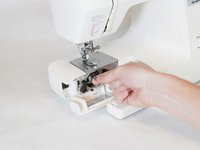
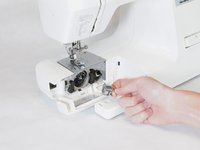
  1. Brother XR-40 Bobbin Replacement, Bobbin: passo 1, immagine 1 di 2 Brother XR-40 Bobbin Replacement, Bobbin: passo 1, immagine 2 di 2
    • Pull off the storage area beneath the needle.

    Chiedi a FixBot
  2. Brother XR-40 Bobbin Replacement: passo 2, immagine 1 di 1
    • Flip open the tab below the needle.

    Chiedi a FixBot
  3. Brother XR-40 Bobbin Replacement: passo 3, immagine 1 di 2 Brother XR-40 Bobbin Replacement: passo 3, immagine 2 di 2
    • Pull on the end of the rectangular tab on the bobbin case. This will pop off the bobbin and bobbin case.

    Chiedi a FixBot
  4. Brother XR-40 Bobbin Replacement: passo 4, immagine 1 di 1
    • Pull the bobbin out of the bobbin case.

    Chiedi a FixBot
Conclusione

To reassemble your device, follow these instructions in reverse order.

Altre 3 persone hanno completato questa guida.

Allison

Membro da: 02/03/14

302 Reputazione

2 guide realizzate

Team

Cal Poly, Team 2-12, Amido Winter 2014 Membro di Cal Poly, Team 2-12, Amido Winter 2014

CPSU-AMIDO-W14S2G12

4 Membri

12 guide realizzate

0Commenti sulla guida

Aggiungi Commento

Visualizza statistiche:

Ultime 24 ore: 2

Ultimi 7 giorni: 5

Ultimi 30 giorni: 52

Tutti i Tempi: 3,216