Salta al contenuto principale

Brother CS6000i Sewing Light Replacement

Cosa ti serve

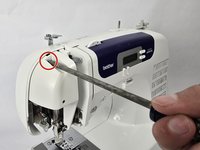
  1. Brother CS6000i Sewing Light Replacement, Body: passo 1, immagine 1 di 2 Brother CS6000i Sewing Light Replacement, Body: passo 1, immagine 2 di 2
    • Remove the five 20 mm Phillips #2 screws on the back of the device.

    • Remove the single 28 mm Phillips #2 screw on the back of the device.

    • Remove the single 23 mm Phillips #2 screw on the back of the device.

  2. Brother CS6000i Sewing Light Replacement: passo 2, immagine 1 di 2 Brother CS6000i Sewing Light Replacement: passo 2, immagine 2 di 2
    • Pull the white cover off.

  3. Brother CS6000i Sewing Light Replacement: passo 3, immagine 1 di 2 Brother CS6000i Sewing Light Replacement: passo 3, immagine 2 di 2
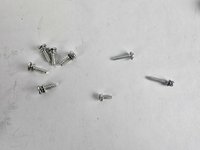
    • Remove the final screw, a 11 mm Phillips #2.

    • After removing all eight screws, you will have five 2 mm screws, one 28 mm screw, one 23 mm screw, and one 11 mm screw, all of which are Phillips #2.

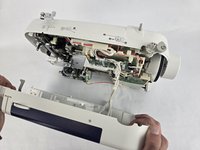
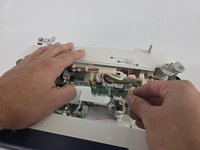
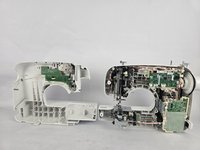
  4. Brother CS6000i Sewing Light Replacement: passo 4, immagine 1 di 3 Brother CS6000i Sewing Light Replacement: passo 4, immagine 2 di 3 Brother CS6000i Sewing Light Replacement: passo 4, immagine 3 di 3
    • Slightly pull apart the two halves of the machine, taking care not to strain the attached cables.

    • Unhook the white wires that are connected to the motherboard.

    • Fully separate the two halves.

  5. Brother CS6000i Sewing Light Replacement, Sewing Light: passo 5, immagine 1 di 1
    • Use a Phillips #2 screwdriver to remove the single 16 mm Phillips #2 screw.

    • Remove the metal plate.

  6. Brother CS6000i Sewing Light Replacement: passo 6, immagine 1 di 1
    • Use a Phillips #2 screwdriver to remove the two 16 mm Phillips #2 screws.

    • Remove the metal plate underneath screws once screws are removed.

  7. Brother CS6000i Sewing Light Replacement: passo 7, immagine 1 di 1
    • Use a standoff tip to remove the 10 mm Phillips #2 screw directly next to the lightbulb.

  8. Brother CS6000i Sewing Light Replacement: passo 8, immagine 1 di 1
    • Disconnect the light connector from the PCB.

  9. Brother CS6000i Sewing Light Replacement: passo 9, immagine 1 di 1
    • Remove the light.

Conclusione

To reassemble your device, follow the above steps in reverse order.
Take your e-waste to an R2 or e-Stewards certified recycler.
Repair didn’t go as planned? Try some basic troubleshooting or ask our Answers community for help.

Aidan Lear

Membro da: 10/31/24

130 Reputazione

1 Guida realizzata

Team

Cuesta, Team 20-1, Krynen Fall 2024 Membro di Cuesta, Team 20-1, Krynen Fall 2024

CUESTA-KRYNEN-F24S20G1

5 Membri

8 Guide realizzate

0Commenti sulla guida

Aggiungi Commento

Visualizza Statistiche:

Ultime 24 Ore: 0

Ultimi 7 Giorni: 2

Ultimi 30 Giorni: 24

Tutti i Tempi: 215