Salta al contenuto principale
Unisciti alla Community delle riparazioni - Crea un account

BlackBerry 7280 Keypad Replacement

Cosa ti serve

  1. BlackBerry 7280 Keypad Replacement, Battery: passo 1, immagine 1 di 3 BlackBerry 7280 Keypad Replacement, Battery: passo 1, immagine 2 di 3 BlackBerry 7280 Keypad Replacement, Battery: passo 1, immagine 3 di 3
    • With your thumb press down on the locking- button on the back of the BlackBerry 7280.

    • Slide the battery cover off the device.

    Chiedi a FixBot
  2. BlackBerry 7280 Keypad Replacement: passo 2, immagine 1 di 2 BlackBerry 7280 Keypad Replacement: passo 2, immagine 2 di 2
    • Remove the lithium-ion battery from the back of the device using your index finger.

    Chiedi a FixBot
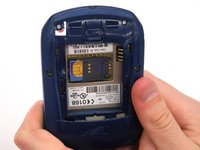
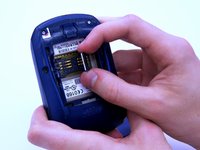
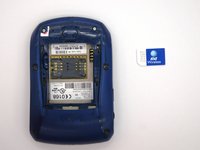
  3. BlackBerry 7280 Keypad Replacement, SIM Card: passo 3, immagine 1 di 3 BlackBerry 7280 Keypad Replacement, SIM Card: passo 3, immagine 2 di 3 BlackBerry 7280 Keypad Replacement, SIM Card: passo 3, immagine 3 di 3
    • Hold the device with both hands.

    • Lift the SIM card holder using your thumb and index finger.

    • Remove the SIM card from the device.

    Chiedi a FixBot
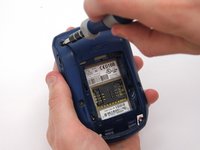
  4. BlackBerry 7280 Keypad Replacement, Back Case: passo 4, immagine 1 di 2 BlackBerry 7280 Keypad Replacement, Back Case: passo 4, immagine 2 di 2
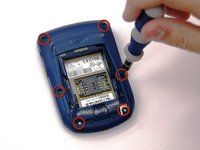
    • Using a Torx T6 screwdriver, remove all six 1/8 inch screws (marked in red) from the back case. Set screws aside.

    • The SIM card has been removed here to prevent damage to the card. This is recommended, but not not required.

    Chiedi a FixBot
  5. BlackBerry 7280 Keypad Replacement: passo 5, immagine 1 di 2 BlackBerry 7280 Keypad Replacement: passo 5, immagine 2 di 2
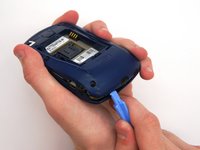
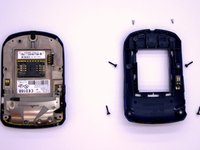
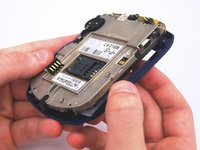
    • Use the plastic opening tool to pry the back case away from the front case.

    Chiedi a FixBot
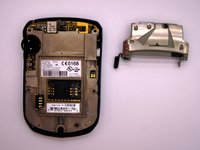
  6. BlackBerry 7280 Keypad Replacement, Front Case: passo 6, immagine 1 di 2 BlackBerry 7280 Keypad Replacement, Front Case: passo 6, immagine 2 di 2
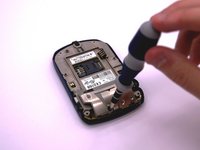
    • Using a Torx T6 screwdriver, remove the lone 1/8 inch screw that holds the upper metal bracket onto the larger metal bracket. Set aside the screw and the bracket.

    Chiedi a FixBot
  7. BlackBerry 7280 Keypad Replacement: passo 7, immagine 1 di 2 BlackBerry 7280 Keypad Replacement: passo 7, immagine 2 di 2
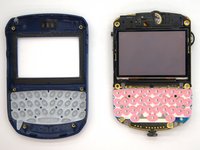
    • Remove the front plastic case from the metal bracket.

    Chiedi a FixBot
  8. BlackBerry 7280 Keypad Replacement, Keypad: passo 8, immagine 1 di 1
    • The keypad sits in the keyboard slots on the front cover. Simply peel the keyboard off and replace.

    Chiedi a FixBot
Conclusione

To reassemble your device, follow these instructions in reverse order.

Un'altra persona ha completato questa guida.

Team

Clemson, Team 12-2, Benson Spring 2013 Membro di Clemson, Team 12-2, Benson Spring 2013

CLEM-BENSON-S13S12G2

4 Membri

11 guide realizzate

0Commenti sulla guida

Aggiungi Commento

Visualizza statistiche:

Ultime 24 ore: 1

Ultimi 7 giorni: 7

Ultimi 30 giorni: 35

Tutti i Tempi: 437