Introduzione
All of the key components that could fail are accessed by removing the Azpen A720 back cover. The process will include removing a couple of screws and then utilizing the plastic opening tool to pry the cover apart from the body of the device.
Cosa ti serve
-
-
-
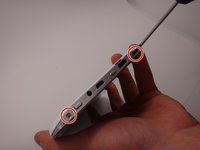
Use a Phillips #00 screwdriver to remove the two 4mm screws found on the top edge of the tablet near the power button.
 Chiedi a FixBot
-
-
-
-
Use the plastic opening tool to pry the white back from the silver frame. Start near the micro SD slot.
-
-




To reassemble your device, follow these instructions in reverse order.

Team

Michigan Tech, Team 1-3, Lauer Spring 2015 Membro di Michigan Tech, Team 1-3, Lauer Spring 2015
MTU-LAUER-S15S1G3
2 Membri
5 guide realizzate
