Salta al contenuto principale
Unisciti alla Community delle riparazioni - Crea un account

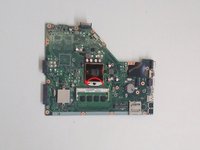
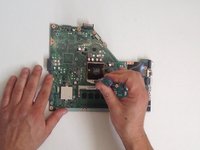
Asus X55C CPU Intel Replacement

Cosa ti serve

Panoramica video

  1. Asus X55C CPU Intel Replacement, Keyboard: passo 1, immagine 1 di 1
    • Switch off the laptop and remove the battery.

    Chiedi a FixBot
  2. Asus X55C CPU Intel Replacement: passo 2, immagine 1 di 3 Asus X55C CPU Intel Replacement: passo 2, immagine 2 di 3 Asus X55C CPU Intel Replacement: passo 2, immagine 3 di 3
    • The Keyboard is held by 5x locking clips.

    • Pick up a little the one side of the Keyboard and start opening the clips one by one.

    • Disconnect the Keyboard flex cable from the mother board and remove the KB.

    • Please SUBSCRIBE to my channel ツ

    Chiedi a FixBot
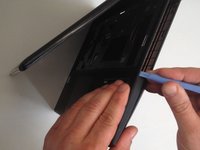
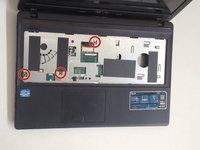
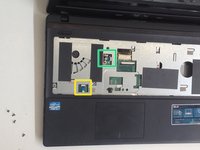
  3. Asus X55C CPU Intel Replacement, Motherboard: passo 3, immagine 1 di 2 Asus X55C CPU Intel Replacement, Motherboard: passo 3, immagine 2 di 2
    • Remove 3x Philips screws.

    • Disconnect the two small flex cables:

    • Power On button flex cable

    • Touch pad flex cable

    Chiedi a FixBot
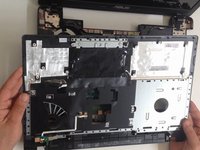
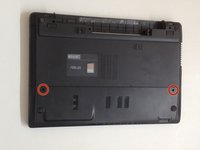
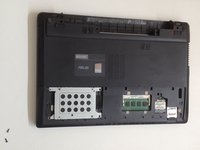
  4. Asus X55C CPU Intel Replacement: passo 4, immagine 1 di 3 Asus X55C CPU Intel Replacement: passo 4, immagine 2 di 3 Asus X55C CPU Intel Replacement: passo 4, immagine 3 di 3
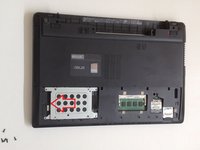
    • Unscrew the two Philips screws and remove the HDD / RAM Cover.

    • Remove three screws securing the hard drive caddy (hard drive assembly).

    • Slide the hard drive assembly to the left to disconnect it from the motherboard.

    Chiedi a FixBot
  5. Asus X55C CPU Intel Replacement: passo 5, immagine 1 di 2 Asus X55C CPU Intel Replacement: passo 5, immagine 2 di 2
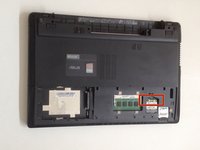
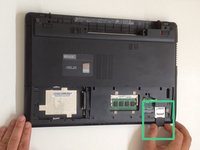
    • Disconnect the two coaxial antenna cables from the Wi-Fi card.

    • Remove any Memory or Dummy card.

    Chiedi a FixBot
  6. Asus X55C CPU Intel Replacement: passo 6, immagine 1 di 3 Asus X55C CPU Intel Replacement: passo 6, immagine 2 di 3 Asus X55C CPU Intel Replacement: passo 6, immagine 3 di 3
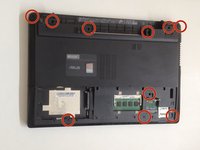
    • The bottom cover is held by 10x Phillips screws. Remove them.

    • With a plastic tool separate the Upper cover and remove it.

    Chiedi a FixBot
  7. Asus X55C CPU Intel Replacement: passo 7, immagine 1 di 3 Asus X55C CPU Intel Replacement: passo 7, immagine 2 di 3 Asus X55C CPU Intel Replacement: passo 7, immagine 3 di 3
    • Disconnect:

    • The Microphone cable

    • The LCD Display flex cable

    • Remove 3x Pillips screws.

    • Lift the board first from the right edge.

    • There is another one cable, from the DC connector, connected to the underside of main board. We should spun the the board to disconnect the DC connector cable.

    Chiedi a FixBot
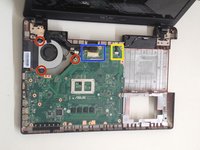
  8. Asus X55C CPU Intel Replacement: passo 8, immagine 1 di 2 Asus X55C CPU Intel Replacement: passo 8, immagine 2 di 2
    Chiedi a FixBot
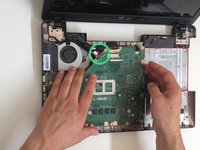
  9. Asus X55C CPU Intel Replacement, CPU Intel: passo 9, immagine 1 di 3 Asus X55C CPU Intel Replacement, CPU Intel: passo 9, immagine 2 di 3 Asus X55C CPU Intel Replacement, CPU Intel: passo 9, immagine 3 di 3
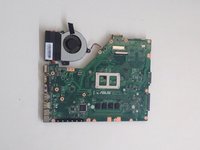
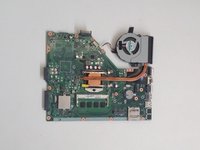
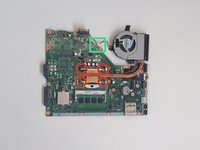
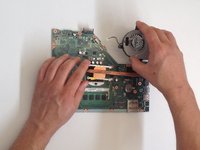
    • Disconnect the Fan cable from the Motherboard.

    • Remove the screws (4x Phillips screws) that hold the cooling system to the Motherboard

    • Remove the Cooling System.

    Chiedi a FixBot
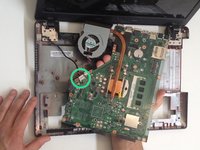
  10. Asus X55C CPU Intel Replacement: passo 10, immagine 1 di 3 Asus X55C CPU Intel Replacement: passo 10, immagine 2 di 3 Asus X55C CPU Intel Replacement: passo 10, immagine 3 di 3
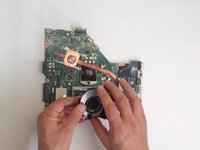
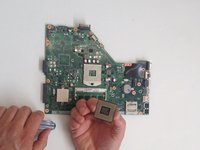
    • Counter clockwise release the screw securing the CPU using a flat head screwdriver.

    • Guideline, lift with equal pressure on two sides of the processor chip to avoid bending any of the pins.

    • Intel Core i3-2370M

    • Before installing the new CPU, clean the Cooling system and put new thermal compound / paste.

    Chiedi a FixBot
Conclusione

To reassemble your device, follow these instructions in reverse order.

Altre 4 persone hanno completato questa guida.

ZFix

Membro da: 12/09/13

197.189 Reputazione

330 guide realizzate

Team

Master Techs Membro di Master Techs

Community

333 Membri

1.479 guide realizzate

5Commenti sulla guida

In step 3 my computer had an extra screw for the DVD drive. So make sure your not trying to pry it open with the screw in like i did.

bill cool - Rispondi Condividi

Hi there!… I have an old Asus X550CL laptop with an I3 processor. So you know if it’s upgradeable to an I7?

Best Regards!

angelo.cesar79 - Rispondi Condividi

I’ve the same laptop. Were you able to upgrade it?

Manish - Rispondi Condividi

Hi, someone let me know if I can upgrade a Asus X55VD's processor from B980 to i7 2670QM.

Or what to take into account? Power usage? Should I only get an i5?

Thanks in advance

Robert Indries - Rispondi Condividi

Hi there what about the shutdown every 30min exactly

SAINTE-COLOMBE Vonjy - Rispondi Condividi

Aggiungi Commento

Visualizza statistiche:

Ultime 24 ore: 2

Ultimi 7 giorni: 16

Ultimi 30 giorni: 91

Tutti i Tempi: 6,533