Questa traduzione è stata generata automaticamente e non è stata ancora revisionata da una persona. Parli questa lingua? Dai un’occhiata.
Introduzione
Questa guida illustra il procedimento per sostituire una batteria usurata o difettosa nel computer portatile Asus Q534U.
Le batterie dei computer portatili si degradano con l'uso; pertanto, se il tuo computer non mantiene una carica sufficiente e presenta un numero elevato di cicli di carica, potresti riuscire a ripristinarlo sostituendo la batteria.
Cosa ti serve
-
-
-
Usa un cacciavite T5 per rimuovere tutte le 10 viti che fissano la copertura inferiore.
-
Togli la cover posteriore del portatile.
 Chiedi a FixBot
-
-
-
Infila uno strumento di apertura sotto il connettore con cavi multifilo della batteria e solleva delicatamente il connettore per scollegare la batteria.
-
-
-
-
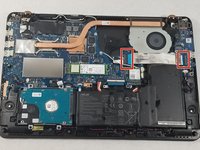
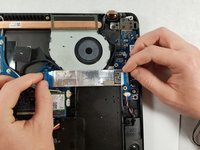
Solleva la linguetta nera accanto al cavo a nastro argentato.
-
Tira leggermente le linguette blu finché il cavo argentato non è libero.
-
-
-
Usa un cacciavite a croce Phillips #00 per rimuovere le 5 viti contrassegnate.
-
Rimuovi delicatamente la batteria.
-
-



Per rimontare il dispositivo, segui queste istruzioni in ordine inverso.
Annulla: non ho completato questa guida.
Altre 18 persone hanno completato questa guida.

7Commenti sulla guida
Is there a website link where I can get a replacement battery for ASUS Q534 UXK ? Model year 2016.
Can this laptop be used without a battery?
Thomas, yes. I found that out by mistake when I didn’t fully connect/lock the new cable and had to go back in and reconnect it. Worked as usual on AC power.
mmedina - thanks for the step by step. Worked like a champ for me.
Dear IFixIt,
Thank you for this straightforward approach to changing the battery on my ASUS Laptop Model Q534UX BHI7T19. The first attempt was 100% successful!! I can say that opening the laptop base was a little scary, but your step-by-step details removed enough fear of me screwing something up that I went for it!! Having the right tools on hand went a long way to getting fast results and great outcome. I highly advise viewers to purchase a tool set to remove the tiny screws and a plastic pry tool set (the one I purchased from Amazon was only $18 and included both) to make this task almost effortless. Without your guidance, I never would have attempted this project. Thanks again!!
Do you have similar guidance for changing out the hard drives on the above ASUS??
Hi Sheri, thanks for your message! We’re so happy this guide was helpful. We have a hard drive guide as well. Check out the Asus Q534U device page, there are several other guides in addition to the battery guide. Thanks again!
