Salta al contenuto principale
Unisciti alla Community delle riparazioni - Crea un account

Asus Padfone X Mini Camera Replacement

Cosa ti serve

  1. Asus Padfone X Mini Camera Replacement, Speaker: passo 1, immagine 1 di 1
    • With the phone facing down, look at the bottom right side corner and there should be a groove. Use a plastic opening tool and lift up to remove outside cover.

    • This is not the cover with the speaker attached.

  2. Asus Padfone X Mini Camera Replacement: passo 2, immagine 1 di 1
    • Lift the battery out from the top of the device.

  3. Asus Padfone X Mini Camera Replacement: passo 3, immagine 1 di 1
    • Around the perimeter, there should be 10 2 mm T5 Torx screws. Take them out.

    • Remove the cover.

  4. Asus Padfone X Mini Camera Replacement: passo 4, immagine 1 di 1
    • Turn the cover over.

    • The speaker is attached to the inside of the cover and to the right of the camera hole.

  5. Asus Padfone X Mini Camera Replacement: passo 5, immagine 1 di 1
    Attrezzo utilizzato in questo passaggio:
    Tweezers
    $4.99
    • Remove speaker with standard tweezers to minimize damage, and replace.

  6. Asus Padfone X Mini Camera Replacement, Screen: passo 6, immagine 1 di 1
    • Detach the black connector on the left hand side of the motherboard.

    • Don't completely remove the black connector.

  7. Asus Padfone X Mini Camera Replacement: passo 7, immagine 1 di 1
    • Disconnect silver connector from the motherboard. It is located on the left hand side above the black connector.

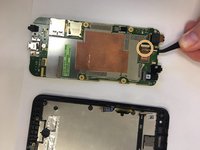
  8. Asus Padfone X Mini Camera Replacement: passo 8, immagine 1 di 2 Asus Padfone X Mini Camera Replacement: passo 8, immagine 2 di 2
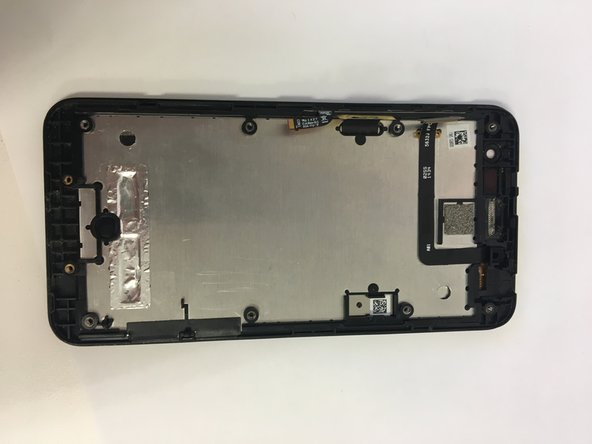
    • Remove motherboard and replace screen.

  9. Asus Padfone X Mini Camera Replacement, Camera: passo 9, immagine 1 di 1
    • Turn over the motherboard.

  10. Asus Padfone X Mini Camera Replacement: passo 10, immagine 1 di 1
    Attrezzo utilizzato in questo passaggio:
    Tweezers
    $4.99
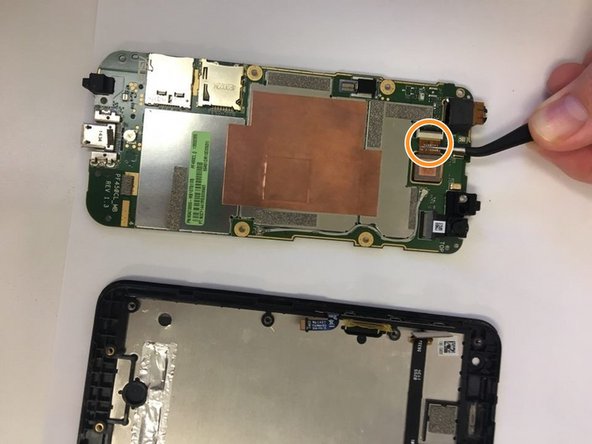
    • Using tweezers pull out the connector that connects the camera to the motherboard.

  11. Asus Padfone X Mini Camera Replacement: passo 11, immagine 1 di 2 Asus Padfone X Mini Camera Replacement: passo 11, immagine 2 di 2
    • Take out the camera.

    • Put in the new camera by sliding the camera connector into the receiver.

Conclusione

To reassemble your device, follow these instructions in reverse order.

0Commenti sulla guida

Aggiungi Commento

Visualizza Statistiche:

Ultime 24 Ore: 4

Ultimi 7 Giorni: 19

Ultimi 30 Giorni: 46

Tutti i Tempi: 424