Introduzione
This guide will show you how to remove the battery of your Asus PadFone S. Some common tools are required for this replacement so make sure you have them before you start. The battery will be difficult to remove so make sure you follow the directions carefully.
Cosa ti serve
-
-
Place your thumb in the charging port and pry the back cover off of the phone.
 Chiedi a FixBot
-
-
-
-
Remove all screws using the T5 Torx screwdriver
-
Lift the back panel off the phone.
-
-
Strumento utilizzato in questo passaggio:Tweezers$4.99
-
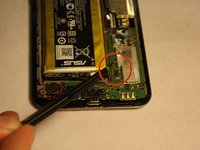
Disconnect the battery from the logic board using tweezers
-
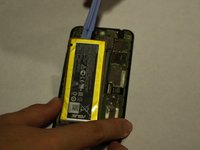
Using the plastic opening tools, lift the battery up from its slot
-


To reassemble your device, follow these instructions in reverse order.
Annulla: non ho completato questa guida.
Un'altra persona ha completato questa guida.

Team

UMass Dartmouth, Team 6-1, Vijaybhaskar Fall 2014 Membro di UMass Dartmouth, Team 6-1, Vijaybhaskar Fall 2014
UMASSD-VIJAYBHASKAR-F14S6G1
3 Membri
10 guide realizzate
