Salta al contenuto principale
Unisciti alla Community delle riparazioni - Crea un account

Apple TV 1st Generation Fan Replacement

Cosa ti serve

    1. Apple TV 1st Generation Fan Replacement, Lower Case: passo 1, immagine 1 di 1
      • Flip the Apple TV over so that the bottom of the unit is facing up.

      • You need to remove the rubber base to get access to the screws.

      • Starting at one side of the device, use a hairdryer or a heat gun to soften the adhesive holding the rubber base in place.

      • The rubber base will be hot after heating, take extreme caution while proceeding to avoid personal injury.

      • While the adhesive is still warm, peel the bottom of the rubber base upwards to detach it from the metal plate.

      • The rubber base can tear if the adhesive hasn't been softened enough.

      • Repeat the procedure described above until the rubber base has been completely removed.

      Chiedi a FixBot

      Aggiungi Commento

    2. Apple TV 1st Generation Fan Replacement: passo 2, immagine 1 di 1
      • Remove the four T10 Torx screws that secure the lower case to the upper case.

      Chiedi a FixBot

      Aggiungi Commento

    3. Apple TV 1st Generation Fan Replacement: passo 3, immagine 1 di 1
      • Carefully lift the lower case from the upper case enough to allow access to the internals of the Apple TV.

      • Be aware that the hard drive is physically attached to the lower case and that a ribbon cable runs from the drive to the logic board in the upper case.

      Chiedi a FixBot

      Aggiungi Commento

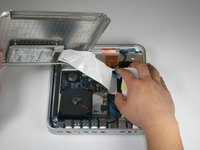
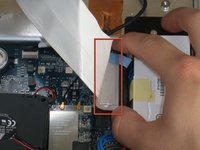
    4. Apple TV 1st Generation Fan Replacement: passo 4, immagine 1 di 2 Apple TV 1st Generation Fan Replacement: passo 4, immagine 2 di 2
      • Carefully pull the hard drive data cable straight up from its socket on the logic board.

      • During reassembly, make sure the hard drive data cable is firmly seated in its socket on the logic board; otherwise, during boot-up you will see a flashing question mark "?".

      Chiedi a FixBot

      Aggiungi Commento

    1. Apple TV 1st Generation Fan Replacement, Fan: passo 5, immagine 1 di 1
      Strumento utilizzato in questo passaggio:
      Tweezers
      $4.99
      • The fan is held in place by three rubber posts.

      • Using a pair of tweezers, squeeze the top of each post and push the post down into the hole. Repeat for all three posts.

      • During reinstallation, it helps to lubricate the rubber posts. Try weaving a string through the holes in the posts to pull them up through the mounting points.

      • Do not excessively pull on the posts, as they may rip.

      Chiedi a FixBot

      Aggiungi Commento

    2. Apple TV 1st Generation Fan Replacement: passo 6, immagine 1 di 1
      • Using a pair of tweezers, pull the fan connector straight up from its socket on the logic board.

      • Lift and remove the fan out of the upper case.

      Chiedi a FixBot

      Aggiungi Commento

Conclusione

To reassemble your device, follow these instructions in reverse order.

Annulla: non ho completato questa guida.

Altre 4 persone hanno completato questa guida.

ropel

Membro da: 11/11/09

119 Reputazione

2 guide realizzate

Team

Cal Poly, Team 18-5, Maness Fall 2009 Membro di Cal Poly, Team 18-5, Maness Fall 2009

CPSU-MANESS-F09S18G5

5 Membri

25 guide realizzate

0Commenti sulla guida

Aggiungi Commento

Visualizza statistiche:

Ultime 24 ore: 0

Ultimi 7 giorni: 12

Ultimi 30 giorni: 57

Tutti i Tempi: 12,597