Salta al contenuto principale
Unisciti alla Community delle riparazioni - Crea un account

Alienware P18G M14X R1 RAM Replacement

Cosa ti serve

    1. Alienware P18G M14X R1 RAM Replacement, Back Cover: passo 1, immagine 1 di 1
      • Loosen the top left and top right 6.5mm PH1 screws that hold down the back cover.

      • The screws will not be able to be removed from the back cover. They can only be loosened or tightened.

      Chiedi a FixBot

      Aggiungi Commento

    2. Alienware P18G M14X R1 RAM Replacement: passo 2, immagine 1 di 1
      • Slide back cover forward using your thumbs.

      Chiedi a FixBot

      Aggiungi Commento

    3. Alienware P18G M14X R1 RAM Replacement: passo 3, immagine 1 di 1
      • Lift up the cover and set aside exposing the internals of the computer.

      Chiedi a FixBot

      Aggiungi Commento

    1. Alienware P18G M14X R1 RAM Replacement, RAM: passo 4, immagine 1 di 1
      • Unscrew the two 6.35 mm using the PH1 screw driver.

      Chiedi a FixBot

      Aggiungi Commento

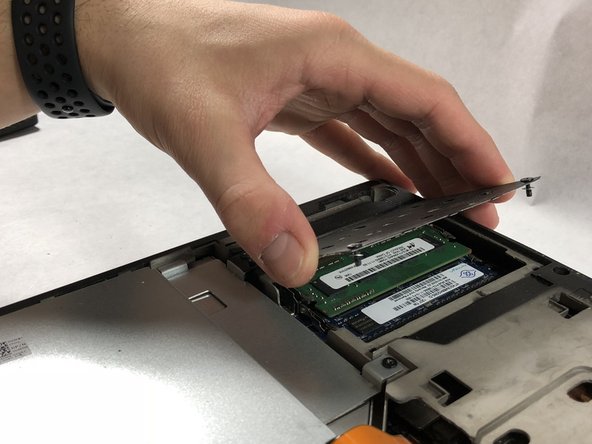
    2. Alienware P18G M14X R1 RAM Replacement: passo 5, immagine 1 di 2 Alienware P18G M14X R1 RAM Replacement: passo 5, immagine 2 di 2
      • Lift the plate and remove it to uncover the RAM sticks.

      Chiedi a FixBot

      Aggiungi Commento

    3. Alienware P18G M14X R1 RAM Replacement: passo 6, immagine 1 di 1
      • Push outward on the prongs that secure the RAM stick in the slots.

      • After releasing the prongs the rams stick will rise up.

      Chiedi a FixBot

      Aggiungi Commento

    4. Alienware P18G M14X R1 RAM Replacement: passo 7, immagine 1 di 1
      • Be very gentle in this step, making sure to not damage anything.

      • Pull the RAM stick out of its housing.

      Chiedi a FixBot

      Aggiungi Commento

    5. Alienware P18G M14X R1 RAM Replacement: passo 8, immagine 1 di 1
      • Push outward on the prongs that secure the RAM stick in the slots.

      • After releasing the prongs the rams stick will rise up.

      Chiedi a FixBot

      Aggiungi Commento

    6. Alienware P18G M14X R1 RAM Replacement: passo 9, immagine 1 di 1
      • Be very gentle in this step, making sure to not damage anything.

      • Pull the second ram stick out of its housing.

      Chiedi a FixBot

      Aggiungi Commento

Conclusione

To reassemble your device, follow these instructions in reverse order.

Annulla: non ho completato questa guida.

0Commenti sulla guida

Aggiungi Commento

Visualizza statistiche:

Ultime 24 ore: 0

Ultimi 7 giorni: 7

Ultimi 30 giorni: 21

Tutti i Tempi: 1,394