Salta al contenuto principale
Unisciti alla Community delle riparazioni - Crea un account

Alienware M17-R1 Screen Lock Assembly Replacement

Cosa ti serve

    1. Alienware M17-R1 Screen Lock Assembly Replacement, Screen Lock Assembly: passo 1, immagine 1 di 1
      • Open the screen until it is flat.

      • Ensure that the surface you are working on can support both the screen and the base of the laptop.

      Chiedi a FixBot

      Aggiungi Commento

    2. Alienware M17-R1 Screen Lock Assembly Replacement: passo 2, immagine 1 di 2 Alienware M17-R1 Screen Lock Assembly Replacement: passo 2, immagine 2 di 2
      • Remove the eight 7 mm screws around the edge of the screen using a Phillips #1 screwdriver.

      • Support the screen from the bottom to make it easier to remove the screws.

      Chiedi a FixBot

      Aggiungi Commento

    3. Alienware M17-R1 Screen Lock Assembly Replacement: passo 3, immagine 1 di 2 Alienware M17-R1 Screen Lock Assembly Replacement: passo 3, immagine 2 di 2
      • Insert the plastic opening tool and gently slide it around the edge of the screen to lift the face of the screen away from its base.

      • Be careful not to break the face of the screen when lifting it.

      Chiedi a FixBot

      Aggiungi Commento

    4. Alienware M17-R1 Screen Lock Assembly Replacement: passo 4, immagine 1 di 3 Alienware M17-R1 Screen Lock Assembly Replacement: passo 4, immagine 2 di 3 Alienware M17-R1 Screen Lock Assembly Replacement: passo 4, immagine 3 di 3
      • Remove the two 3 mm Phillips #1 screws using a Phillips #1 screwdriver.

      • Pull the assembly grip away to remove it.

      • Remove the two 5 mm screws using a Phillips #1 screwdriver.

      Chiedi a FixBot

      Aggiungi Commento

    5. Alienware M17-R1 Screen Lock Assembly Replacement: passo 5, immagine 1 di 2 Alienware M17-R1 Screen Lock Assembly Replacement: passo 5, immagine 2 di 2
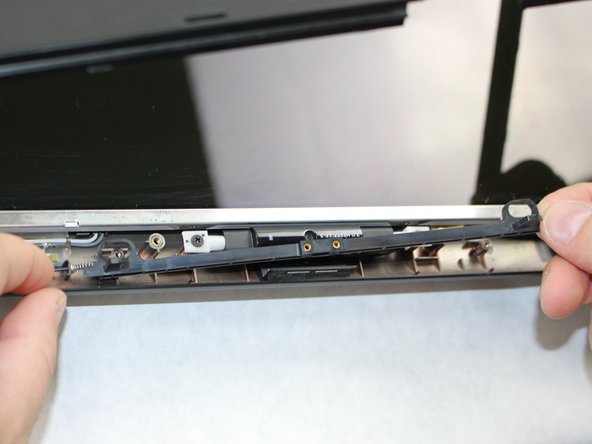
      • Push in the assembly towards the spring.

      • Gently lift the slider from the side opposite to the spring and pull the slider away from the spring.

      • The spring is loosely secured to the slider and may fall off and become lost when removing the slider.

      Chiedi a FixBot

      Aggiungi Commento

    6. Alienware M17-R1 Screen Lock Assembly Replacement: passo 6, immagine 1 di 2 Alienware M17-R1 Screen Lock Assembly Replacement: passo 6, immagine 2 di 2
      • If the spring is defective, slide it off the end of the assembly and replace it.

      Chiedi a FixBot

      Aggiungi Commento

Conclusione

To reassemble your device, follow these instructions in reverse order.

Annulla: non ho completato questa guida.

0Commenti sulla guida

Aggiungi Commento

Visualizza statistiche:

Ultime 24 ore: 3

Ultimi 7 giorni: 17

Ultimi 30 giorni: 49

Tutti i Tempi: 746