Salta al contenuto principale
Unisciti alla Community delle riparazioni - Crea un account

Akai MPK25 Keys Replacement

Cosa ti serve

  1. Akai MPK25 Keys Replacement, Face Plate: passo 1, immagine 1 di 1
    • Remove all the selector knob covers by pulling them off.

    Chiedi a FixBot

    Aggiungi Commento

  2. Akai MPK25 Keys Replacement: passo 2, immagine 1 di 1
    • Using needle nose pliers, remove the washers from the four corner selector knobs.

    Chiedi a FixBot

    Aggiungi Commento

  3. Akai MPK25 Keys Replacement: passo 3, immagine 1 di 1
    • Flip the device over. Using a Philips #2 screw driver, remove the fourteen 10.3 mm black screws holding the back panel in place.

    Chiedi a FixBot

    Aggiungi Commento

  4. Akai MPK25 Keys Replacement: passo 4, immagine 1 di 3 Akai MPK25 Keys Replacement: passo 4, immagine 2 di 3 Akai MPK25 Keys Replacement: passo 4, immagine 3 di 3
    • Carefully flip the device to the front making sure you secure the face plate and the chassis together.

    • Please use care in following the step above to avoid ripping the ribbon cables connecting the two sides.

    Chiedi a FixBot

    Aggiungi Commento

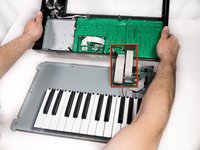
  5. Akai MPK25 Keys Replacement: passo 5, immagine 1 di 3 Akai MPK25 Keys Replacement: passo 5, immagine 2 di 3 Akai MPK25 Keys Replacement: passo 5, immagine 3 di 3
    • Rotate the device 180 degrees and carefully remove the face plate by slightly lifting the screen side towards you and then sliding the bottom out from under the keys.

    • Use care when doing the step above so that the ribbon connectors which connect the top of the chassis to the top of the face plate are not damaged.

    Chiedi a FixBot

    Aggiungi Commento

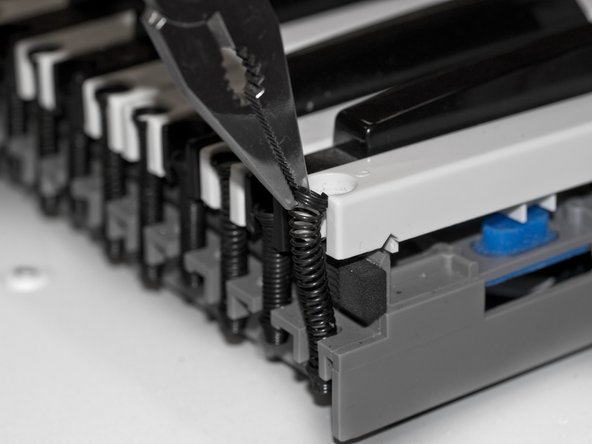
  6. Akai MPK25 Keys Replacement, Keys: passo 6, immagine 1 di 2 Akai MPK25 Keys Replacement, Keys: passo 6, immagine 2 di 2
    • Using needle nose pliers, grip the top of the spring coil, that is holding down the key, and gently lift the spring away from the key.

    Chiedi a FixBot

    Aggiungi Commento

  7. Akai MPK25 Keys Replacement: passo 7, immagine 1 di 1
    • Lift the key from the front of the keyboard towards the back in order to remove it completely.

    Chiedi a FixBot

    Aggiungi Commento

Conclusione

To reassemble the keyboard and close up the case, follow these instructions in reverse order.

Annulla: non ho completato questa guida.

Altre 7 persone hanno completato questa guida.

Will Saba

Membro da: 01/11/13

412 Reputazione

2 guide realizzate

Team

Cal Poly, Team 20-6, Maness Winter 2013 Membro di Cal Poly, Team 20-6, Maness Winter 2013

CPSU-MANESS-W13S20G6

5 Membri

6 guide realizzate

0Commenti sulla guida

Aggiungi Commento

Visualizza statistiche:

Ultime 24 ore: 1

Ultimi 7 giorni: 15

Ultimi 30 giorni: 48

Tutti i Tempi: 11,935