Salta al contenuto principale
Unisciti alla Community delle riparazioni - Crea un account

3DR Solo Battery Replacement

    1. 3DR Solo Battery Replacement, Battery: passo 1, immagine 1 di 1
      • Lay the drone down on its legs so that the power button is facing up.

      Chiedi a FixBot

      Aggiungi Commento

    2. 3DR Solo Battery Replacement: passo 2, immagine 1 di 1
      • Locate the release button on top of the battery.

      Chiedi a FixBot

      Aggiungi Commento

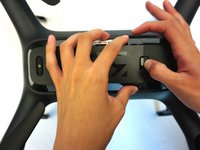
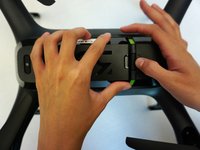
    3. 3DR Solo Battery Replacement: passo 3, immagine 1 di 2 3DR Solo Battery Replacement: passo 3, immagine 2 di 2
      • With one finger, push down on the release button and with the other, grip the battery and slide it to the left.

      Chiedi a FixBot

      Aggiungi Commento

    4. 3DR Solo Battery Replacement: passo 4, immagine 1 di 1
      • Lift the battery from the drone.

      Chiedi a FixBot

      Aggiungi Commento

Conclusione

To reassemble your device, follow these instructions in reverse order.

Annulla: non ho completato questa guida.

Un'altra persona ha completato questa guida.

Team

0Commenti sulla guida

Aggiungi Commento

Visualizza statistiche:

Ultime 24 ore: 2

Ultimi 7 giorni: 7

Ultimi 30 giorni: 35

Tutti i Tempi: 2,221