Domande popolari nel forum
Fai una domandaNon ci sono domande. Sii il primo a porre una domanda!
Informazioni generali
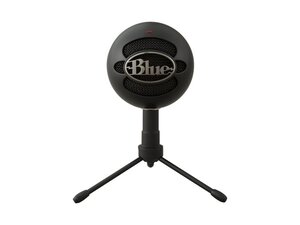
Il Snowball iCE Ubisoft Bundle è una variante rebranded del microfono a condensatore USB Logitech Snowball iCE, progettato per lo streaming da desktop, il podcasting e la chat vocale. È dotato di una capsula a condensatore cardioide e connettività USB plug-and-play per Windows e macOS. Il microfono utilizza materiali durevoli, tra cui una griglia in metallo e una base/supporto in metallo ponderato per la stabilità. Le caratteristiche principali includono un profilo compatto, una ripresa cardioide a pattern singolo ottimizzata per le voci ravvicinate e una semplice alimentazione USB senza necessità di interfacce esterne.
Identificazione
Il Logitech SNOWBALL ICE UBISOFT BNDL può essere identificato dal numero di modello (M/N A00145). L'etichetta del modello si trova sul lato inferiore della base del microfono e le confezioni/adesivi specifici del bundle indicano la promozione Ubisoft. Questa etichetta elenca i numeri di modello (M/N), parte (P/N) e serie (S/N).
Specifiche
- Produttore: Logitech
- Modello: Snowball iCE (variante bundle Ubisoft)
- Fattore di forma: Microfono a condensatore USB da scrivania con supporto/base in metallo integrato
- Pattern polare: Cardioide (pattern singolo)
- Tipo di capsula: Capsula a condensatore (fissa, interna)
- Risoluzione audio: 16 bit, 44,1/48 kHz (USB PCM, plug-and-play)
- Connettività: USB 2.0 Type-A (cavo integrato)
- Alimentazione: Alimentato tramite porta USB
- Compatibilità OS: Windows e macOS (plug-and-play; solitamente non sono richiesti driver)
- Dimensioni e peso: Forma compatta da scrivania; microfono con base in metallo per una stabilità ponderata (il produttore lo classifica come piccolo microfono da scrivania)
- Accessori inclusi: Cavo USB integrato, base/supporto in metallo regolabile; il bundle Ubisoft potrebbe includere materiali promozionali (nessun codice SKU di accessori separati elencato nel supporto Logitech)
Soluzione problemi
I guasti comuni sono errori di rilevamento/alimentazione (solitamente causati da un cavo/porta USB difettoso o problemi di riconoscimento dell'host) e audio intermittente/cadute di segnale. Esegui la diagnosi testando il microfono su un'altra porta USB o computer, ispezionando il cavo e il connettore USB per eventuali danni e controllando le impostazioni di riconoscimento e di input predefinito nella gestione dispositivi/audio del sistema operativo.
Per ulteriore assistenza, visita: Contatta il supporto Logitech tramite https://support.logi.com per la soluzione problemi, richieste di garanzia e informazioni sul prodotto.
Informazioni aggiuntive
Informazioni sulla garanzia
Consulta la pagina della garanzia regionale di Logitech (vedi support.logi.com/warranty) per i termini; la durata della garanzia varia in base alla regione.

