|
Nessuna Risposta Punteggio 0 |
My usb port is not working |
Informazioni generali
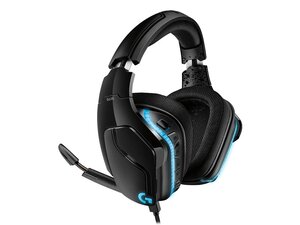
Le Logitech G635 sono cuffie da gaming cablate LIGHTSYNC progettate per offrire un audio coinvolgente con illuminazione RGB personalizzabile. Utilizzano driver Logitech Pro-G da 50 mm e DTS Headphone:X 2.0 per creare un audio surround 7.1 virtuale su PC, e sono completamente configurabili tramite Logitech G HUB. Le cuffie sono realizzate con materiali durevoli per un uso a lungo termine e includono un microfono ad asta rimovibile e connettività multi-piattaforma (USB e 3,5 mm). Le caratteristiche principali includono LIGHTSYNC RGB, driver Pro‑G e controlli sul dispositivo per disattivare il microfono e regolare il volume.
Identificazione
Le Logitech G635 possono essere identificate dal numero di modello (M/N A-00081). L'etichetta del modello si trova sull'alloggiamento delle cuffie (sotto l'archetto o all'interno dei cuscinetti per cuffie). Questa etichetta riporta i numeri di modello (M/N), di parte (P/N) e di serie (S/N).
Specifiche
- Modello / SKU: G635 (Codice parte / SKU: 981-000750)
- Driver: Driver Pro‑G da 50 mm (Logitech Pro‑G)
- Surround / DSP: DTS Headphone:X 2.0 (surround 7.1 virtuale su PC tramite USB + Logitech G HUB)
- Risposta in frequenza (cuffie): 20 Hz – 20 kHz
- Impedenza: 39 Ω (passiva), 5 kΩ (attiva)
- Sensibilità: 93 dB SPL/mW
- Microfono: Microfono ad asta rimovibile, cardioide (unidirezionale), elemento da 6 mm; risposta in frequenza 100 Hz – 10 kHz
- Connettività: USB 2.0 (PC per funzioni DTS/G HUB) e analogica da 3,5 mm (console/mobile); lunghezza cavo PC 2,8 m, lunghezza cavo mobile 1,5 m
- Dimensioni e peso: Altezza 188 mm, larghezza 195 mm, profondità 87 mm; peso (senza cavo) 344 g
- Compatibilità: Windows 7/8/10 (64 bit per il supporto G HUB completo), Mac, PlayStation 4/5, Xbox One (3,5 mm), Nintendo Switch, tablet e dispositivi mobili tramite 3,5 mm
- Garanzia: Garanzia hardware limitata di 2 anni (i termini regionali possono variare)
Soluzione problemi
I guasti comuni rilevanti per la riparazione includono l'assenza di audio o il malfunzionamento del microfono, spesso causati da danni ai cavi, guasti al connettore o problemi software/driver. Diagnostica il problema testando sia le connessioni USB che quelle da 3,5 mm, provando un altro dispositivo/porta, ispezionando i cavi e i connettori alla ricerca di danni visibili e reinstallando/aggiornando Logitech G HUB per verificare le funzioni DTS e il firmware del dispositivo.
Per ulteriore aiuto nella soluzione problemi, visita: https://support.logi.com/hc/en-us/articl...
Informazioni aggiuntive
Informazioni sulla garanzia
Garanzia hardware limitata di 2 anni — invia una richiesta di garanzia tramite il supporto Logitech; i termini variano in base alla regione.

