Domande popolari nel forum
Fai una domandaNon ci sono domande. Sii il primo a porre una domanda!
Documenti
Informazioni generali
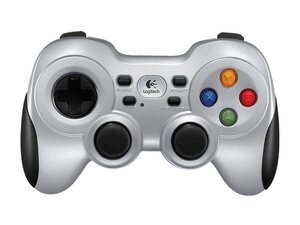
Il Logitech F710 Wireless Gamepad è un controller wireless pensato per PC, progettato per offrire una configurazione familiare in stile console per il gaming su PC. Utilizza un nano ricevitore USB senza fili e supporta sia le modalità XInput che DirectInput tramite un interruttore di modalità di input montato sulla parte superiore. L'unità è costruita in plastica ABS resistente con impugnature testurizzate/gommate e include motori di vibrazione a feedback radiale per il force feedback. Le caratteristiche principali includono due joystick analogici, un D-pad, pulsanti dorsali e una portata wireless di 10 m.
Identificazione
Il Logitech F710 WIRELESS GAMEPAD può essere identificato dal numero di modello (M/N G-R0001). L'etichetta del modello si trova sulla scocca insieme a un interruttore di modalità di input montato sulla parte superiore, etichettato come XInput/DirectInput. Questa etichetta elenca il numero di modello (M/N), il codice componente (P/N) e il numero di serie (S/N).
Specifiche tecniche
- Fattore di forma: Gamepad wireless (configurazione in stile console)
- Piattaforme supportate: PC (non compatibile con console Xbox 360)
- Sistemi operativi supportati: Windows XP, Windows XP x64, Windows Vista, Windows Vista x64, Windows 7, Windows 7 x64
- Connettività: Senza fili (nano ricevitore USB proprietario); portata wireless 10 m
- VID_PID ricevitore (USB): 046D_C21F (modalità XInput), 046D_C219 (modalità DirectInput); nano ricevitore USB 1.1 Full Speed
- Interruttore modalità di input: Sì, sulla parte superiore dell'unità; selezionabile tra XInput o DirectInput
- Alimentazione / Batterie: 2 pile alcaline AA
- Feedback aptico: Motori di vibrazione a feedback radiale (rumble) — modello/produttore del motore non specificato
- Controlli: Due joystick analogici, D-pad, pulsanti frontali (A/B/X/Y), due pulsanti dorsali, pulsanti Start/Back/Mode
- Dimensioni e peso (con batterie): Gamepad: 142 mm × 98 mm × 75 mm, 285 g; Ricevitore: 14,4 mm × 18,7 mm × 6,1 mm, 1,8 g
- Pulsanti / Contatti: Interruttori di tipo a membrana/cuscinetto di contatto (produttore/modello non specificato)
Soluzione problemi
I guasti comuni rilevanti per la riparazione includono la perdita della connettività wireless (spesso risolta sostituendo il nano ricevitore o cambiando le batterie), pulsanti appiccicosi o non reattivi a causa dell'usura dei contatti a membrana e drift del joystick analogico dovuto all'usura del potenziometro. Diagnostica il problema sostituendo le batterie, testando il VID/PID del ricevitore su un altro PC, ispezionando i contatti della batteria per verificare la presenza di corrosione e aprendo la scocca per controllare i cavi a nastro, le connessioni saldate e i collegamenti dei motori.
Per ulteriore assistenza con la soluzione problemi, visita: Visita support.logi.com per supporto prodotto, download e opzioni di contatto.
Informazioni aggiuntive
Informazioni sulla garanzia
La garanzia del produttore varia a seconda della regione; consulta la pagina della garanzia di Logitech per conoscere la copertura e le procedure di reclamo.
Guida introduttiva al Logitech Wireless Gamepad F710 (EN, ES)
Guida introduttiva al Logitech Wireless Gamepad F710 (EN, DE, FR)
Manuale d'uso del Logicool Wireless Gamepad F710
Guida introduttiva al Logitech F710 Wireless Gamepad (EN, ZH)
Guida introduttiva al Logitech Wireless Gamepad F710 (EN, ZH)
Guida introduttiva al Logitech Wireless Gamepad F710 (EN, DE, FR, RU, PL)

