
Altoparlante
Questa traduzione è stata generata automaticamente e non è stata ancora revisionata da una persona. Parli questa lingua? Rivedila.
|
3 Risposte Punteggio 1 |
My tablet is showing => FASTBOOT MODE on the screen what should I do? |
|
2 Risposte Punteggio 1 |
Why is my acer tablet not turning on |
|
2 Risposte Punteggio 1 |
My tablet touch screen is cracked what should I do? |
|
1 Risposta Punteggio 0 |
Why is my screen touch malfunctioning? |
Questi sono alcuni strumenti di uso comune usati per lavorare su questo dispositivo. Potrebbe non essere necessario ogni strumento per ogni procedura.
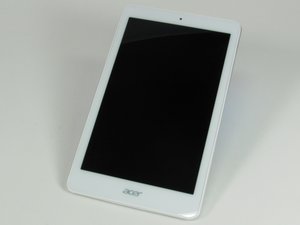
Questo tablet Acer Iconia Tab 8 A1-860 è dotato di un display da 8 pollici con una cornice bianca attorno allo schermo e una parte posteriore grigio argento. Pesa 360 g e misura 21,6 per 13 cm. Sul retro è presente un piccolo adesivo quadrato con la scritta "Intel Inside". Il logo "Acer" compare sia sulla parte anteriore inferiore che sul retro. Sul lato posteriore in alto a sinistra si trova uno slot per microSD. Nella parte superiore del dispositivo sono presenti una porta micro USB e il jack cuffie.
Il tablet Acer Iconia Tab 8 A1-860 può essere identificato dal numero di modello e dal numero di serie riportati sull'etichetta bianca situata sul fondo del dispositivo. Per ulteriore assistenza nell'identificazione del tuo tablet, visita la pagina di supporto Acer.
FIX-SUOVANEN-S16S1G1
3 Membri
12 guide realizzate
Ultime 24 ore: 0
Ultimi 7 giorni: 4
Ultimi 30 giorni: 34
Tutti i Tempi: 5,004


