Salta al contenuto principale

Lanciato a maggio 2020, il MacBook Pro da 13" ha dei processori quad-core Intel di ottava generazione Core i5 e i7, e grafica integrata Intel Iris Plus 645. (Modello A2289/EMC3456 con due porte Thunderbolt 3)

Touch ID works but Power Button does not.

Like the title suggests, the Touch ID on the power button is working fine however the button itself seems to have lost its connection to the logic board, pressing it does not do any good, there are certain times when it is not pressed, yet the computer forcefully shuts down leading me to conclude that the power button part of the Touch ID button is malfunctioning.

I am able to turn it on by opening up the lid/connecting the charger.

I have tried taking it to Apple and they were suggesting to replace the entire logic board. I am seeking any troubleshooting or guidance here if possible. How difficult would it be to replace only the Touch ID/power button on this model?

Also aware that there is a pairing required for Touch ID with the logic board. Any guidance on that is appreciated as well.

Rispondi a questa domanda Anch'io ho questo problema

Questa è una buona domanda?

Punteggio 0
Aggiungi un commento

1 Risposta

Sadly, replacing the logic board maybe your only option!

Apple efforts to make access to one's data as limited as possible so the power button and logic board are bonded together so one can't use another power button as the TouchID sensor within the power button data link to the logic board will no longer handshake properly.

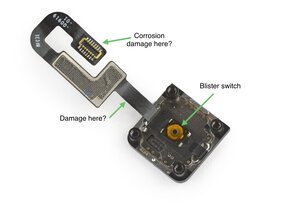
The physical switch is a simple blister switch but the flex cable from the button is quite fragile so it's possible it was damaged. In either case almost microscopic repair would be needed to either replace the switch or patch the flex cable. If either fail to fix things then it would be tome to replace the logic board.

This is the 2016 model TouchID/Power Button for reference yours will be similar

Block Image

Maybe you can find someone with the deeper micro electronics skills to fix your button that is if that's the problem. I would dig a bit deeper, what does the diagnostics tel, you? Restart the system and press the D key to enter. Review this Apple T/N Use Apple Diagnostics to test your Mac let us know what if any errors popped.

Questa risposta è stata utile?

Punteggio 0
Aggiungi un commento

Aggiungi la tua risposta

czar_PG sarà eternamente grato.
Visualizza Statistiche:

Ultime 24 Ore: 0

Ultimi 7 Giorni: 1

Ultimi 30 Giorni: 6

Tutti i Tempi: 40