
 2
2 Trackpad not working after replacing battery
TL;DR: Replaced the battery and now the trackpad doesn't work, and looking for help to understand what went wrong.
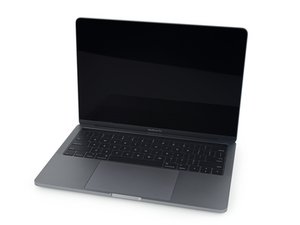
Last weekend, I was replacing the battery of my Mac based on the instructions at Sostituzione batteria MacBook Pro 13" Touch Bar 2018. I had read all the comments on the page and steps so I decided to try doing it without taking the trackpad out, following the instructions of https://youtu.be/GcFYJgwem1s mentioned in the comments.
I thought I was careful enough with everything while using isopropyl alcohol instead as well but somehow managed to make the trackpad non-functional: moving the pointer or clicking doesn't work. External trackpad works with both cable and Bluetooth. Resetting the SMC, PRAM, and NVRAM didn't fix it. I doubt the trackpad itself is broken.
I reopened the back panel and checked the trackpad cable, and noticed it had a crease in it (the thing in the photos pointed to by the arrows):
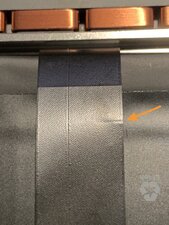
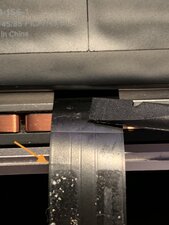
Not sure if this is the cause of my problem, and I didn't check its condition before starting.
The trackpad had some problems with clicking or moving the pointer, or both–can't remember, to be honest–for a few days maybe a year ago, and resetting the SMC, PRAM, and NVRAM may have fixed it, but I can't remember it for certain. At the time, I didn't touch the hardware in any way, yet the problem went away somehow.
Should I remove the trackpad and check the cable and how it's connected from both ends? Should I just order a new trackpad cable and change it to see if it helps? Or should I check something else first?
Happy to hear any suggestions and experience related to this.
Questa è una buona domanda?

1 Commento
Hi I have this exact problem did you ever find out what it was
da Anna T