Salta al contenuto principale

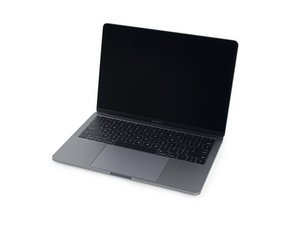
A1708 / EMC 2978 — Lanciato nell'ottobre 2016, questo MacBook Pro entry-level conserva i tradizionali tasti funzione (invece della Touch Bar OLED). La versione function key adotta l'Intel Core i5 e 2 porte Thunderbolt.

Keyboard backlight not working

Hello,

My 13” MacBook Pro late 2016 A1708, keyboard backlight stopped working.

It was working just fine, then after my laptop went to service and checking if everything was fine, it stopped working. Keys are fully functional, everything works except the backlight.

I’m not sure if it’s possible that the cable connecting it is the problem? Keyboard connection flex cable is slightly damaged from before, could this be the reason? And if so, can I simply replace it to get my backlight to work again? Or backlight for keyboard is a different cable? (Than the one under the right speaker)

Thanks!

Risposto! Visualizza la risposta Anch'io ho questo problema

Questa è una buona domanda?

Punteggio 0

1 Commento

Hi guys, its me after a few months, i just had to wait a long time to get this keyboard backlight flex cable from ebay. This indeed solved my problem. I replaced it with a new one, and backlight as well as the full functionality of the keyboard is now restored. Love the backlight again! I hope my fix can help someone else with the same problem

da

Aggiungi un commento

1 Risposta

Soluzione Prescelta

The keyboard cable is replaceable! MacBook Pro 13" Retina (A1708, A2159) Keyboard Cable Unlike older systems this cable carries the fans power as well as the keyboard and its backlight power.

Immagine Replace a damaged or torn keyboard cable in a 2016 or 2017 model A1708 or 2019 model A2159 13" MacBook Pro with Retina Display and Function Keys.

Prodotto

MacBook Pro 13" Retina (A1708, A2159) Keyboard Cable

$12.99

Questa risposta è stata utile?

Punteggio 3

3 Commenti:

Thank you for reply! Great to hear that, honestly!

I have ordered a new flex cable, and will try to change it when it arrives. I haven’t seen any similar posts about this so i will let you know if that fixed my problems for anybody else with similar one.

da

Another question, do i have to take out the battery cable first before doing any work? Or is it ok if the laptop is just turned off with battery connector still connected? @danj

da

@chris51297 - Just disconnect the battery following the first 15 Steps in this guide Sostituzione batteria MacBook Pro 13" Function Keys fine 2016 If you are careful you can get to the uppercase connector after removing the fan (still tricky!) Otherwise you'll need to lift the logic board off.

da

Aggiungi un commento

Aggiungi la tua risposta

Krsto Dominkovic sarà eternamente grato.
Visualizza Statistiche:

Ultime 24 Ore: 0

Ultimi 7 Giorni: 0

Ultimi 30 Giorni: 9

Tutti i Tempi: 669