
Turn the power off and on again message
When i turn on the camera, the lens focusing two or three times open and close, then the message comes "TURN THE POWER OFF AND ON AGAIN" in the display.
Questa è una buona domanda?
Guide di riparazione
Impara ad aggiustare praticamente qualsiasi cosa con le nostre guide passo-passo.
App
Il tuo aiutante tascabile per le riparazioni.
FixBot
L'amichevole assistente di riparazione IA.
Riparabilità
Scopri perché è importante che un prodotto sia riparabile.
Smontaggi
Dai una sbirciata all'interno degli ultimi dispositivi.
Forum Risposte
Condividi le tue soluzioni e fatti aiutare da un amico.
Trova la tua comunità
Trova team, eventi e colleghi riparatori.
Aiutaci
Contribuisci a rendere la conoscenza della riparazione gratuita e accessibile a tutti.
Diritto alla Riparazione
Scopri il movimento del "Diritto alla riparazione" e come sostenerlo.
In evidenza
Componenti e strumenti di qualità supportati dalla nostra garanzia a vita.
Strumenti
Fai acquisti nella nostra vasta selezione di strumenti di precisione.
Ricambi
Acquista componenti supportati dalla nostra garanzia di qualità.
Batterie per iPhone
Batterie testate e garantite e un kit con tutto il necessario.
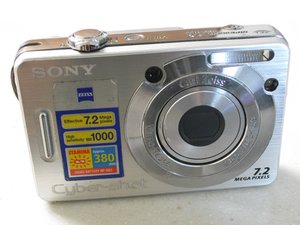
La Sony Cyber-shot DSC-W55 è stata presentata all'inizio del 2007. Rispetto al modello precedente, dotato di una fotocamera da 5,1 megapixel, questa versione è stata aggiornata con una fotocamera da 7,2 megapixel e dispone di 56 MB di memoria interna.
When i turn on the camera, the lens focusing two or three times open and close, then the message comes "TURN THE POWER OFF AND ON AGAIN" in the display.
balaji, this message most commonly appears when the lens does not fully retract or opens.
"Lens won't fully extend 
Screen shows Turn off and on again. 
Turn off the camera, remove the batteries from the camera and wait a few minutes. Replace the batteries and turn the camera on.
If the lens will still not extend, replace the batteries and turn the camera on.
If the lens will still not extend, check to see if there is any particles in the lens barrel. Blow air in the lens barrel to remove any sand or grit that may be preventing the lens from extending completely." I've had some good result by using a vacuum cleaner to assist the lend to extend and to clean it out. There is also more generic information about that on here. You will find a decent video (not exactly your model, but same problem), on youtube Hope this helps, good luck.
5 Commenti:
I couldn't believe it; it worked on the third try. It didn't open at once but after leaving it on for a few seconds more than usual, it suddenly started working again. I had tried putting a piece of paper in between the shutters to dislodge anything too, an idea I got from the provided link.
i have sony w810 camera showing mesg on screen turn off and on again now what i do?
da muhammad
Excellent Thanks! Changed battery and used a high powered vacuum cleaner. So far so good!
excellent advise used the vacuum cleaner to clear sand then used a baby wipe to clean and lubricate
da mark250721
wow!! followed the link provided and not sure what i did (either the paper one or blowing air) and it worked!!! thank you so much!!!
da jade59379
1. Throw the camera on a carpeted floor.
2. Blow on the lens.
3. Switch on the camera.
This is what I did when it said "Turn the power off and on again." It works fine now
23 Commenti:
"Shock to the System" approach works! Start off with minimal velocity, increase as necessary until problem is solved (or camera shatters).
da MFMauceri
Thank you! Try to air flush dust as advice above .Same error "Turn off then on..."
Then i did your way .throw the camara on carpeted floor....Ta-da!! It works...
Really don't know what to say...but thanks for this method....It works for me...I just keep laugh now...Crazy...
da Minh Bui
i can't believe it it worked! thanks
Totally worked!! HAHAHA! I couldn't believe it. I had been trying to pry that lens open gently but it kept giving the error message. I don't have soft carpet at my work so I just threw the camera fairly hard onto my padded office chair. TADAAA! It worked! Thanks a bunch.
btw, I have the Sony Cyber-shot 10.1 mega pixel DSC-W180.
I was at my last straws and did this . Worked for me.
da jasonoki
Reputazione: 1
Try to force rotate counterclockwise the back lens to force open it
Reputazione: 1
I had the same message, my lens cover was still on! Took it off and all was fine!
Juan Diego Chica @juandiegochica
Reputazione: 1
Thank you, it was a matter of insisting and forcing the opening slowly without abusing it. This happened to me after having had the Sony DSC-W120 cyber-shot camera turned off for several months. Greetings from Medellin, Colombia
SPANISH
Gracias, fue cuestionde insistrle y forzar la apertura del lentente sin abusar. Esto me ocurri luego de hbaer tenido la camara cyber-shot sony dsc-w120 apagada por varios meses. Saludos desde Medellin, Colombia
Ultime 24 ore: 9
Ultimi 7 giorni: 44
Ultimi 30 giorni: 271
Tutti i Tempi: 100,409
4 Commenti
how can i fix it??
da Fadhili Madaraka
how can i fix ti problame
da Fadhili Madaraka
Fadhili Madaraka wht did you try? Did you check my answer below?
da oldturkey03
Turn power off and on again for the nth time...same problem
da may_mojica71