Introduzione
A short battery life on the HP Stream 13-c010nr is a common problem experienced. Follow this guide to do the replacement yourself.
Cosa ti serve
-
-
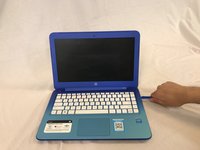
Remove the five rubber feet from the bottom of the laptop with a plastic opening tool.
 Chiedi a FixBot
-
-
-
-
Flip the laptop over and open it up.
-
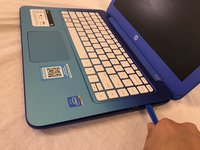
Wedge a plastic opening tool between the keyboard and bottom case, pry upwards to separate the two pieces.
-
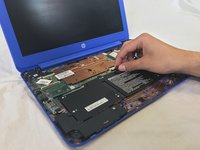
Lift up the keyboard.
-
-
-
Use a spudger to flip up the retaining flaps on the keyboard ribbon cable ZIF sockets.
-
Pull up the ribbon cables from their sockets.
-
-
-
Remove the eight 5mm Phillips #0 screws from the battery.
-
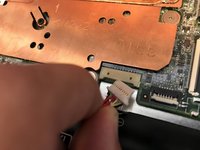
Disconnect the battery from the motherboard.
-
Pull the battery up and out of the laptop.
-




To reassemble your device, follow these instructions in reverse order.
Annulla: non ho completato questa guida.
Un'altra persona ha completato questa guida.

Team

USF Tampa, Team S1-G3, Cagle Spring 2018 Membro di USF Tampa, Team S1-G3, Cagle Spring 2018
USFT-CAGLE-S18S1G3
4 Membri
12 guide realizzate
