Salta al contenuto principale

Samsung Refrigerator Control Panel Replacement

Cosa ti serve

  1. Samsung Refrigerator Control Panel Replacement, Unplug your refrigerator: passo 1, immagine 1 di 1
    • Unplug your refrigerator before you begin your repair.

    • If you are testing or repairing the following items, you may also need to shut off and disconnect the water supply:

    • Condenser fan motor

    • Compressor motor and thermal overload device

    • Water supply valve assembly

  2. Samsung Refrigerator Control Panel Replacement, Open the refrigerator doors: passo 2, immagine 1 di 2 Samsung Refrigerator Control Panel Replacement, Open the refrigerator doors: passo 2, immagine 2 di 2
    • Open both French doors for the refrigerator compartment.

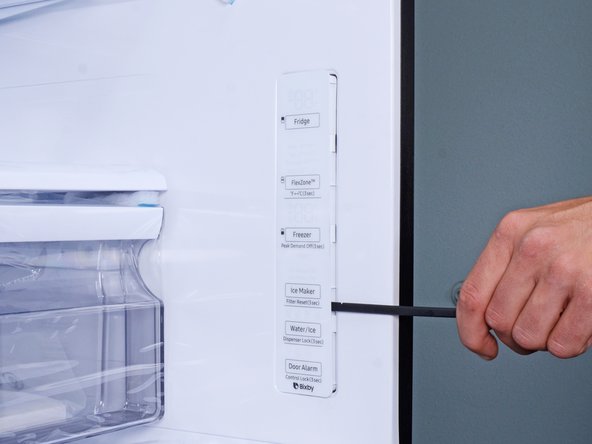
  3. Samsung Refrigerator Control Panel Replacement, Loosen the control panel: passo 3, immagine 1 di 3 Samsung Refrigerator Control Panel Replacement, Loosen the control panel: passo 3, immagine 2 di 3 Samsung Refrigerator Control Panel Replacement, Loosen the control panel: passo 3, immagine 3 di 3
    • The control panel has plastic clips around its perimeter that secure it to the refrigerator wall.

    • Insert a spudger into the seam along the right edge of the control panel.

    • You can also use a flathead screwdriver, but be careful not to let the screwdriver slip, or you'll scratch your refrigerator surface.

    • Press the spudger in firmly and pry to loosen the panel.

    • Use your spudger to slide and pry around the control panel to loosen it from the refrigerator wall.

  4. Samsung Refrigerator Control Panel Replacement: passo 4, immagine 1 di 1
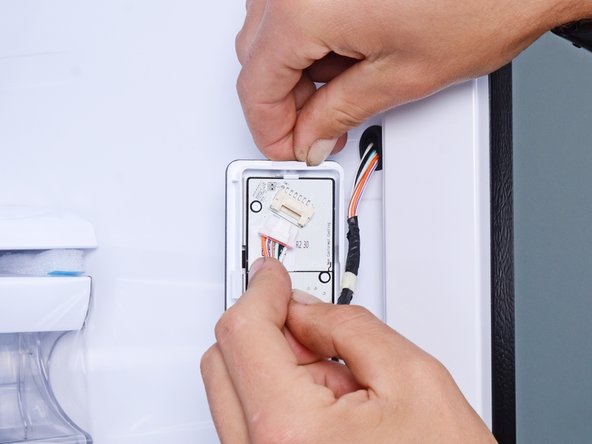
    • Flip the control panel over to reveal the cable connector.

  5. Samsung Refrigerator Control Panel Replacement: passo 5, immagine 1 di 2 Samsung Refrigerator Control Panel Replacement: passo 5, immagine 2 di 2
    • Use your fingers to slide the cable connector out of its socket.

  6. Samsung Refrigerator Control Panel Replacement, Remove the control panel: passo 6, immagine 1 di 1
    • Remove the control panel.

Conclusione

To reassemble your device, follow these instructions in reverse order.

Take your e-waste to an R2 or e-Stewards certified recycler.

Repair didn’t go as planned? Ask our Answers Community for help.

nicO

Membro da: 04/14/15

15.945 Reputazione

89 Guide realizzate

Team

Team Vulcan Membro di Team Vulcan

Staff

6 Membri

212 Guide realizzate

0Commenti sulla guida

Aggiungi Commento

Visualizza Statistiche:

Ultime 24 Ore: 6

Ultimi 7 Giorni: 36

Ultimi 30 Giorni: 99

Tutti i Tempi: 3,465