Introduzione
Amazon Kindle Paperwhite da 6" pollici di 3a generazione, schermo da 300 PPI. Questa guida richiede che il Kindle sia spento, e che vengano usati uno strumento di apertura di plastica, pinzette angolari di precisione, e un cacciavite PH000.
Cosa ti serve
-
-
Fai leva delicatamente sullo schermo con lo strumento di apertura in plastica. Inizia agli angoli e fallo scorrere sotto i bordi finché non torni al punto iniziale.
-
-
-
Usa estrema cautela quando sollevi il telaio. Fai attenzione a non far cadere il tuo strumento di leva sotto il display. Guarda sotto il coperchio mentre lavori, separando il display dall'adesivo del telaio.
-
Assicurati che il tuo separatore passi attraverso entrambi i lati del telaio sopra il display.
-
Nella seconda foto è il livello attraverso il quale desideri far passare in sicurezza il tuo strumento.
-
Nella terza foto è mostrato un esempio di ciò che può andare storto. Se ciò accade, il tuo strato del digitalizzatore leggerà in modo errato i tocchi e il display sarà danneggiato permanentemente.
-
-
-
-
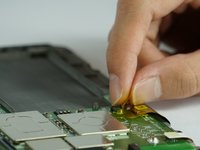
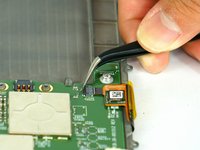
Capovolgi la chiusura nera con uno strumento in plastica di apertura, e poi gentilmente tira indietro il cavo a nastro arancione.
-


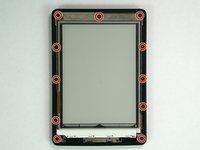
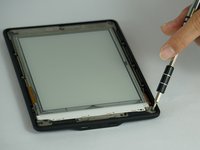


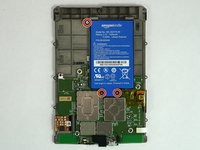
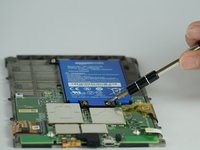






Per ricomporre il tuo dispositivo, segui queste istruzioni in ordine inverso.
Annulla: non ho completato questa guida.
Altre 20 persone hanno completato questa guida.
Un ringraziamento speciale a questi traduttori:
100%


Questi traduttori ci stanno aiutando ad aggiustare il mondo! Vuoi partecipare?
Inizia a tradurre ›


Team

USF Tampa, Team 14-3, Lacy Spring 2016 Membro di USF Tampa, Team 14-3, Lacy Spring 2016
USFT-LACY-S16S14G3
4 Membri
14 Guide realizzate
15Commenti sulla guida
hi there thank youfor your helping tutorial.
i just bought some used Kindle in order to buy at my shop. but i have a problem with some Kindle that i disassembled in order to have some spare parts and especially with the screen.
even after removing the screen it will stay frozen, even if i change the motherboard with a new one it will stay on the last screen shown.
Might you give me any explanation about the issue? and is that a way to reset the screen in order to use it as spare parts for other kindles?
Thank you so much for this tutorial! Thanks to it I was able to replace a (physically) broken display. I un-assembled the entire device, let it rest until the shipment from China arrived and re-assembled it. It works flawlessly again and looks like new. One word of caution, though: The new display came without frame and removing the old display from the frame (both are pretty tightly glued together) resulted in quite some patient work and many pieces of broken glass (even with having it all heated). Anyway it worked out like a charm at the end!
Hello, where I can but a replacement screen for Kindle Paperwhite 300 ppi?? Thanks!!
For anyone curious, the panel number for the PW3 is ED060KD1. You can use this to look it up on eBay etc.
Do you have to take the broken screen out of the frame and then put the new one in? Is it difficult?
Chris -
