Salta al contenuto principale

Electro-Harmonix Bass Mono Synth Wiring Repair

Cosa ti serve

  1. Electro-Harmonix Bass Mono Synth Wiring Repair, Electro-Harmonix Bass Mono Synth Wiring Repair: passo 1, immagine 1 di 2 Electro-Harmonix Bass Mono Synth Wiring Repair, Electro-Harmonix Bass Mono Synth Wiring Repair: passo 1, immagine 2 di 2
    • Gently pry the five knobs with an opening tool until they are loose.

    • Once the knobs are loose, gently pull them off.

    • Be careful not to scratch or damage the pedal's paint.

  2. Electro-Harmonix Bass Mono Synth Wiring Repair: passo 2, immagine 1 di 2 Electro-Harmonix Bass Mono Synth Wiring Repair: passo 2, immagine 2 di 2
    • Using the adjustable wrench, loosen the hex nuts by turning them counterclockwise.

    • Once the hex nuts are loose, remove them and their washers by hand.

    • Remember to keep each size of hex nut and washer separate for easy reassembly.

  3. Electro-Harmonix Bass Mono Synth Wiring Repair: passo 3, immagine 1 di 2 Electro-Harmonix Bass Mono Synth Wiring Repair: passo 3, immagine 2 di 2
    • Using the adjustable wrench, remove the hex nuts from the stomp buttons.

    • The stomp buttons will become loose as the hex nuts are removed.

  4. Electro-Harmonix Bass Mono Synth Wiring Repair: passo 4, immagine 1 di 3 Electro-Harmonix Bass Mono Synth Wiring Repair: passo 4, immagine 2 di 3 Electro-Harmonix Bass Mono Synth Wiring Repair: passo 4, immagine 3 di 3
    • Using the adjustable wrench, remove the hex nuts and their washers from the left and right sides of the pedal.

  5. Electro-Harmonix Bass Mono Synth Wiring Repair: passo 5, immagine 1 di 3 Electro-Harmonix Bass Mono Synth Wiring Repair: passo 5, immagine 2 di 3 Electro-Harmonix Bass Mono Synth Wiring Repair: passo 5, immagine 3 di 3
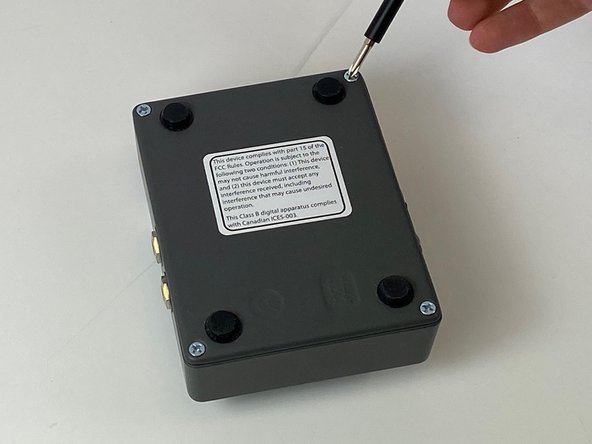
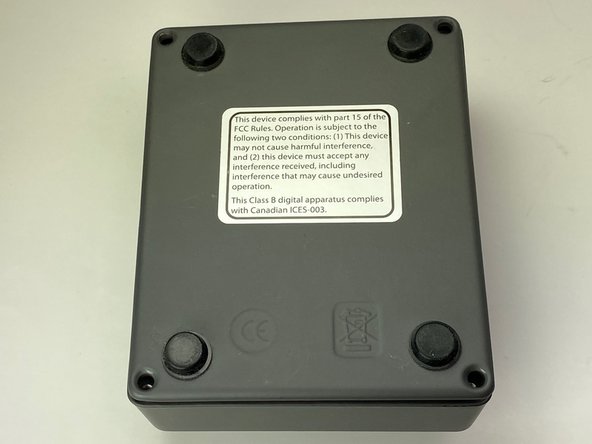
    • Use a Phillips #1 screwdriver to remove all four screws from the back of the device.

    • Remove the back plate from the pedal.

  6. Electro-Harmonix Bass Mono Synth Wiring Repair: passo 6, immagine 1 di 3 Electro-Harmonix Bass Mono Synth Wiring Repair: passo 6, immagine 2 di 3 Electro-Harmonix Bass Mono Synth Wiring Repair: passo 6, immagine 3 di 3
    • The motherboard will be loose at this step except for the 9V power port which is snug in the case.

    • Using an opening tool, push or pry the 9V power port free of the case.

    • Gently remove the motherboard.

    • The stomp buttons will be loose at this step, so remember where they came from.

  7. Electro-Harmonix Bass Mono Synth Wiring Repair: passo 7, immagine 1 di 1
    • Put on personal protective equipment. This includes safety goggles, gloves, and closed toed shoes.

    • Using the soldering tool, solder the damaged connections of the I/O jacks on the bottom of the motherboard.

    • If you have no experience with soldering, follow this guide.

Conclusione

To reassemble your device, follow these instructions in reverse order.

Un'altra persona ha completato questa guida.

0Commenti sulla guida

Aggiungi Commento

Visualizza Statistiche:

Ultime 24 Ore: 2

Ultimi 7 Giorni: 4

Ultimi 30 Giorni: 11

Tutti i Tempi: 640