Salta al contenuto principale
Unisciti alla Community delle riparazioni - Crea un account

Durofix RV332 Battery LED Replacement

Cosa ti serve

  1. Durofix RV332 Battery LED Replacement, Battery LED: passo 1, immagine 1 di 1
    • Remove the six 13 mm screws from the side of the power screwdriver using a #0 Phillips screwdriver.

  2. Durofix RV332 Battery LED Replacement: passo 2, immagine 1 di 2 Durofix RV332 Battery LED Replacement: passo 2, immagine 2 di 2
    • Using a plastic opening tool, separate the case in two to expose the internals of the cordless screwdriver.

  3. Durofix RV332 Battery LED Replacement: passo 3, immagine 1 di 3 Durofix RV332 Battery LED Replacement: passo 3, immagine 2 di 3 Durofix RV332 Battery LED Replacement: passo 3, immagine 3 di 3
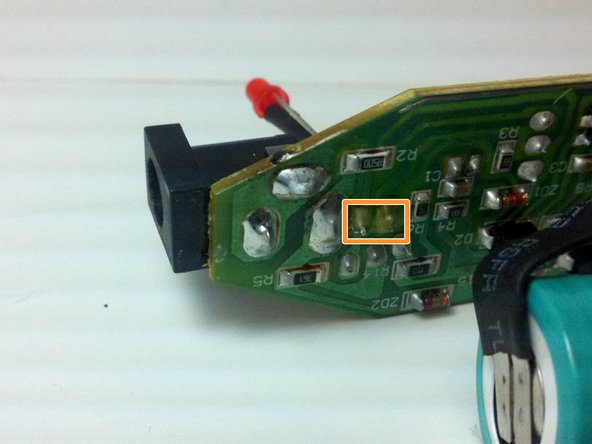
    • Remove the printed circuit board, LED, battery, and motor assembly from the screwdriver casing.

    • Use a soldering iron to melt the solder from the LED's two pins on the printed circuit board.

    • Remove the LED from the circuit board while the solder is still melted.

  4. Durofix RV332 Battery LED Replacement: passo 4, immagine 1 di 2 Durofix RV332 Battery LED Replacement: passo 4, immagine 2 di 2
    • Place the positive leg of the new LED through the positive hole in the printed circuit board and solder it into place.

    • Place the negative leg of the LED through the negative hold in the printed circuit board and solder it into place.

Conclusione

To reassemble your device, follow these instructions in reverse order.

Replace the printed circuit board, the new battery, the LED, and the motor assembly. Put the case back together and replace the six 13 mm screws in the case using the #0 Phillips head screw driver.

Un'altra persona ha completato questa guida.

Tyler Vincent

Membro da: 02/24/14

503 Reputazione

4 Guide realizzate

Team

1Commento della guida

Hello, I would ask the author about the type and model number of the electronic element marked as Q1 on the PCB (transistor or thyristor) on the third picture in Step 3 of this article, because mine is burnt out, and on this picture can't be read anything.

Greetings,

Plam

Пламен Петракиев - Replica Condividi

Aggiungi Commento

Visualizza Statistiche:

Ultime 24 Ore: 4

Ultimi 7 Giorni: 22

Ultimi 30 Giorni: 41

Tutti i Tempi: 1,394