Salta al contenuto principale

Back Cover Removal

Solo Prerequisita
Questa è una guida che contiene solo i prerequisiti! Questa guida fa parte di un'altra procedura e non è destinata ad essere utilizzata da sola.

Cosa ti serve

  1. Back Cover Removal, Back Cover Removal: passo 1, immagine 1 di 2 Back Cover Removal, Back Cover Removal: passo 1, immagine 2 di 2
    Attrezzo utilizzato in questo passaggio:
    Tweezers
    $4.99
    • Before you begin, be sure to turn off your laptop and unplug it from the outlet.

    • Use tweezers to pry and remove the center screw cover on the back cover.

  2. Back Cover Removal: passo 2, immagine 1 di 2 Back Cover Removal: passo 2, immagine 2 di 2
    • Use a Phillips screwdriver to unscrew the nine 6.8 mm screws securing the back cover.

  3. Back Cover Removal: passo 3, immagine 1 di 1
    • Use a spudger to pry around the base edges of the back cover to loosen it from the laptop.

    • Do not fully remove the cover, as it is still attached to the laptop with cables.

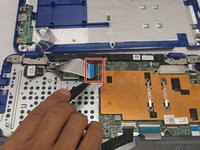
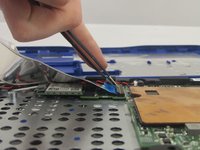
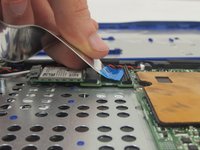
  4. Back Cover Removal: passo 4, immagine 1 di 3 Back Cover Removal: passo 4, immagine 2 di 3 Back Cover Removal: passo 4, immagine 3 di 3
    • If you are only replacing the battery, you can skip this step. Be careful not to strain the still-connected cable as you work.

    • Unlock the wide ZIF connector securing the flex cable.

    • To unlock a ZIF connector, use the tip of a spudger or your fingernail to flip up the small, hinged locking flap.

    • Pull the ribbon cable outwards to disconnect the back cover from the motherboard.

Conclusione

To reassemble your device, follow these instructions in reverse order.

Un'altra persona ha completato questa guida.

0Commenti sulla guida

Aggiungi Commento

Visualizza Statistiche:

Ultime 24 Ore: 0

Ultimi 7 Giorni: 0

Ultimi 30 Giorni: 1

Tutti i Tempi: 98