Salta al contenuto principale
Unisciti alla Community delle riparazioni - Crea un account

MacBook Pro 15" Retina Display Mid 2012 Feet Replacement

Cosa ti serve

  1. MacBook Pro 15" Retina Display Mid 2012 Feet Replacement, Lower Case: passo 1, immagine 1 di 1
    • Remove the following P5 pentalobe screws securing the lower case to the MacBook Pro:

    • Eight 3.0 mm

    • Two 2.3 mm

    Chiedi a FixBot

    Aggiungi Commento

  2. MacBook Pro 15" Retina Display Mid 2012 Feet Replacement: passo 2, immagine 1 di 1
    • Lifting from the edge nearest the clutch cover, lift the lower case off the MacBook Pro.

    • Set the lower case aside.

    Chiedi a FixBot

    Aggiungi Commento

  3. MacBook Pro 15" Retina Display Mid 2012 Feet Replacement, Feet: passo 3, immagine 1 di 2 MacBook Pro 15" Retina Display Mid 2012 Feet Replacement, Feet: passo 3, immagine 2 di 2
    • Peel away any stickers from the backside of the rear case covering the feet you have chosen to replace.

    • Any stickers you remove will most likely be unsalvageable for re-use. That's okay! Your MacBook does not need them to function.

    Chiedi a FixBot

    Aggiungi Commento

  4. MacBook Pro 15" Retina Display Mid 2012 Feet Replacement: passo 4, immagine 1 di 2 MacBook Pro 15" Retina Display Mid 2012 Feet Replacement: passo 4, immagine 2 di 2
    Strumento utilizzato in questo passaggio:
    Tweezers
    $4.99
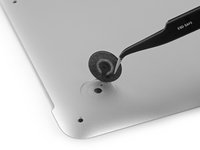
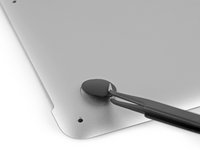
    • Remove any broken or damaged feet.

    • If the foot you are replacing is still intact, you can use your tweezers push it out from the inside.

    • If the old foot is difficult to remove, use a hair dryer or a heat gun to apply some heat to the area and loosen the adhesive.

    Chiedi a FixBot

    Aggiungi Commento

  5. MacBook Pro 15" Retina Display Mid 2012 Feet Replacement: passo 5, immagine 1 di 1
    • Scrub the foot cavity with adhesive remover to remove any remaining adhesive.

    Chiedi a FixBot

    Aggiungi Commento

  6. MacBook Pro 15" Retina Display Mid 2012 Feet Replacement: passo 6, immagine 1 di 1
    • Wipe the foot cavity with an isopropyl alcohol prep pad to remove any cleaner residue and prep the area for the adhesive on the new foot.

    Chiedi a FixBot

    Aggiungi Commento

  7. MacBook Pro 15" Retina Display Mid 2012 Feet Replacement: passo 7, immagine 1 di 1
    • Peel a replacement foot from the plastic backing.

    • The adhesive is fairly strong—make sure that you are peeling the foot up, not tearing the plastic backing.

    Chiedi a FixBot

    Aggiungi Commento

  8. MacBook Pro 15" Retina Display Mid 2012 Feet Replacement: passo 8, immagine 1 di 3 MacBook Pro 15" Retina Display Mid 2012 Feet Replacement: passo 8, immagine 2 di 3 MacBook Pro 15" Retina Display Mid 2012 Feet Replacement: passo 8, immagine 3 di 3
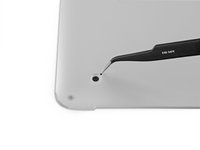
    • Align the new foot inside the cavity.

    • Make sure the alignment nub on the foot is lined up with the small hole near the perimeter of the pad.

    • You may want to use a pencil to lightly mark where the alignment nub is located. Be careful not to scratch the lower case with your pencil.

    • Lay the foot down while keeping it properly aligned.

    • Check for proper alignment from the inside of the case. The alignment nub should be slightly visible through the alignment hole.

    Chiedi a FixBot

    Aggiungi Commento

  9. MacBook Pro 15" Retina Display Mid 2012 Feet Replacement: passo 9, immagine 1 di 2 MacBook Pro 15" Retina Display Mid 2012 Feet Replacement: passo 9, immagine 2 di 2
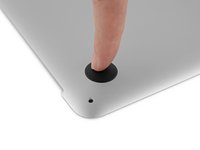
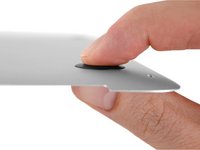
    • Press the new foot into place firmly with your finger, then apply pressure by pinching the foot from either side of the case with your finger and your thumb.

    • Maintain pressure for 30 seconds to set the pressure-sensitive adhesive.

    • Repeat the last seven steps for any remaining broken or worn feet.

    Chiedi a FixBot

    Aggiungi Commento

Conclusione

To reassemble your device, follow these instructions in reverse order.

Annulla: non ho completato questa guida.

Altre 19 persone hanno completato questa guida.

Taylor Dixon

Membro da: 06/26/18

72.558 Reputazione

94 guide realizzate

0Commenti sulla guida

Aggiungi Commento

Visualizza statistiche:

Ultime 24 ore: 1

Ultimi 7 giorni: 18

Ultimi 30 giorni: 118

Tutti i Tempi: 10,112