Salta al contenuto principale
Unisciti alla Community delle riparazioni - Crea un account

MacBook Pro 13" Retina Display Mid 2014 MagSafe DC-In Board Replacement

Cosa ti serve

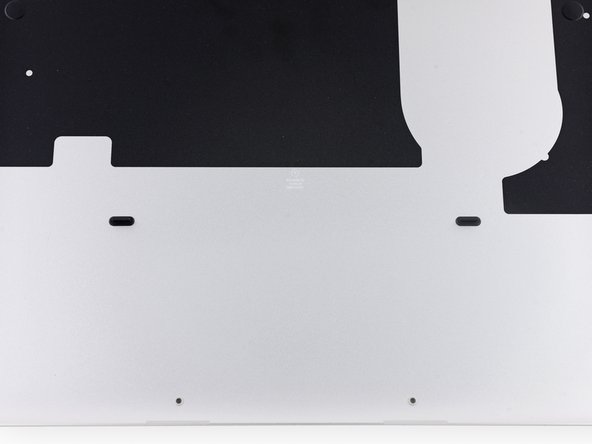
  1. MacBook Pro 13" Retina Display Mid 2014 MagSafe DC-In Board Replacement, Lower Case: passo 1, immagine 1 di 1
    Strumento utilizzato in questo passaggio:
    Magnetic Project Mat
    $16.96
    • Remove the following ten screws securing the lower case to the upper case:

    • Two 2.3 mm P5 Pentalobe screws

    • Eight 3.0 mm P5 Pentalobe screws

    • Throughout this repair, keep track of each screw and make sure it goes back exactly where it came from to avoid damaging your device.

    Chiedi a FixBot

    Aggiungi Commento

  2. MacBook Pro 13" Retina Display Mid 2014 MagSafe DC-In Board Replacement: passo 2, immagine 1 di 1
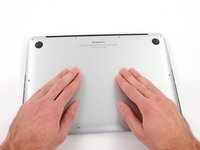
    • Wedge your fingers between the upper case and the lower case.

    • Gently pull the lower case away from the upper case to remove it.

    Chiedi a FixBot

    Aggiungi Commento

  3. MacBook Pro 13" Retina Display Mid 2014 MagSafe DC-In Board Replacement: passo 3, immagine 1 di 2 MacBook Pro 13" Retina Display Mid 2014 MagSafe DC-In Board Replacement: passo 3, immagine 2 di 2
    • The lower case is connected to the upper case with two plastic clips near its center.

    • During reassembly, gently push down the center of the lower case to reattach the two plastic clips.

    Chiedi a FixBot

    Aggiungi Commento

  4. MacBook Pro 13" Retina Display Mid 2014 MagSafe DC-In Board Replacement, Battery Connector: passo 4, immagine 1 di 1
    • If necessary, remove the plastic cover adhered to the battery contact board.

    Chiedi a FixBot

    Aggiungi Commento

  5. MacBook Pro 13" Retina Display Mid 2014 MagSafe DC-In Board Replacement: passo 5, immagine 1 di 2 MacBook Pro 13" Retina Display Mid 2014 MagSafe DC-In Board Replacement: passo 5, immagine 2 di 2
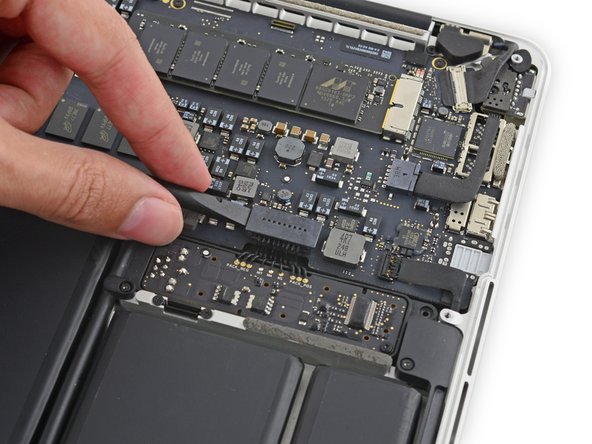
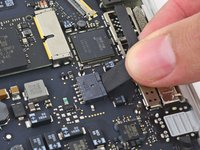
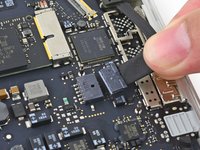
    • Use the flat end of a spudger to lift the battery connector straight up out of its socket on the logic board.

    • Be sure you lift up only on the connector itself, not the socket, or you risk permanent damage to the logic board.

    Chiedi a FixBot

    Aggiungi Commento

  6. MacBook Pro 13" Retina Display Mid 2014 MagSafe DC-In Board Replacement: passo 6, immagine 1 di 1
    • Bend the battery connector up out of the way to prevent accidental contact with its socket during your repair.

    Chiedi a FixBot

    Aggiungi Commento

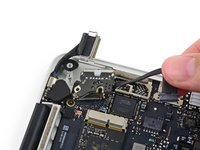
  7. MacBook Pro 13" Retina Display Mid 2014 MagSafe DC-In Board Replacement, MagSafe DC-In Board: passo 7, immagine 1 di 3 MacBook Pro 13" Retina Display Mid 2014 MagSafe DC-In Board Replacement, MagSafe DC-In Board: passo 7, immagine 2 di 3 MacBook Pro 13" Retina Display Mid 2014 MagSafe DC-In Board Replacement, MagSafe DC-In Board: passo 7, immagine 3 di 3
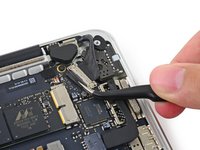
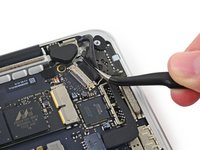
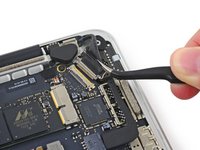
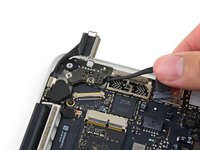
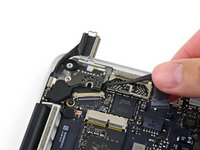
    • Grab the black plastic tab to flip the display cable connector open and pull it straight out of its socket on the logic board.

    • Pull in the direction of the cable, parallel to the logic board. Do not pull up.

    Chiedi a FixBot

    Aggiungi Commento

  8. MacBook Pro 13" Retina Display Mid 2014 MagSafe DC-In Board Replacement: passo 8, immagine 1 di 2 MacBook Pro 13" Retina Display Mid 2014 MagSafe DC-In Board Replacement: passo 8, immagine 2 di 2
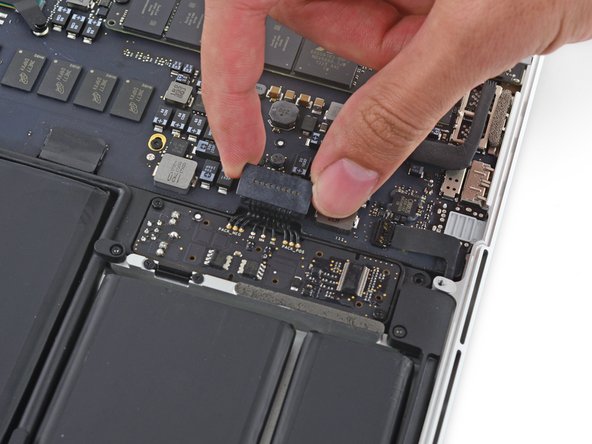
    • Pull the DC-In board connector straight out of its socket on the logic board.

    Chiedi a FixBot

    Aggiungi Commento

  9. MacBook Pro 13" Retina Display Mid 2014 MagSafe DC-In Board Replacement: passo 9, immagine 1 di 1
    • Remove the two 3.5 mm T5 Torx screws securing the MagSafe DC-In board to the upper case.

    • You may need to gently push the display cable out of the way to expose the screws.

    Chiedi a FixBot

    Aggiungi Commento

  10. MacBook Pro 13" Retina Display Mid 2014 MagSafe DC-In Board Replacement: passo 10, immagine 1 di 3 MacBook Pro 13" Retina Display Mid 2014 MagSafe DC-In Board Replacement: passo 10, immagine 2 di 3 MacBook Pro 13" Retina Display Mid 2014 MagSafe DC-In Board Replacement: passo 10, immagine 3 di 3
    • Use the MagSafe DC-In board cable to pull the board out and up from the upper case to remove it.

    Chiedi a FixBot

    Aggiungi Commento

Conclusione

To reassemble your device, follow these instructions in reverse order.

Annulla: non ho completato questa guida.

Altre 30 persone hanno completato questa guida.

Sam Goldheart

Membro da: 10/18/12

477.471 Reputazione

538 guide realizzate

Team

iFixit Membro di iFixit

Staff

122 Membri

25.947 guide realizzate

7Commenti sulla guida

Thanks very much, took me 10 mins, A nice cheap and fast repair for my damaged MagSafe socket

lewismacqueen - Rispondi Condividi

Thank you for your guidance! Spent $30 on tools as opposed to hundreds and made a simple repair

Brian Smithson - Rispondi Condividi

Thank you ...just what we need !..

Mark White - Rispondi Condividi

Did anyone else lose the display to their MacBook Pro mid 2014 after following this repair?

Vance - Rispondi Condividi

yes I just did and wonder what you did to solve this?

Kaleem - Rispondi Condividi

Aggiungi Commento

Visualizza statistiche:

Ultime 24 ore: 0

Ultimi 7 giorni: 19

Ultimi 30 giorni: 102

Tutti i Tempi: 18,834