Salta al contenuto principale

Weinmann VENTImotion and VENTIlogic Power Board Replacement

Attrezzature medicali
Né iFixit né questa guida di riparazione sono approvati dal produttore del dispositivo medicale o affiliati ad esso.
  1. Weinmann VENTImotion and VENTIlogic Power Board Replacement, Power Board: passo 1, immagine 1 di 2 Weinmann VENTImotion and VENTIlogic Power Board Replacement, Power Board: passo 1, immagine 2 di 2
    • Open the Device by following these steps:

    • Open the device only with the power supply plug disconnected.

    • Place the device on a non-slip surface with the top facing downwards.

    • Remove the filter cassette from the top part of the housing

    • Undo and remove the 6 screws (34)

    • Open the bottom part of the housing (35) away to the side.

    • Undo the connecting cables for the humidifier (42) and the alarm (43)

    • You can now put the bottom part of the housing (35) to one side.

  2. Weinmann VENTImotion and VENTIlogic Power Board Replacement: passo 2, immagine 1 di 1
    • Disconnect the power board connecting cable (45) from the power board (41).

  3. Weinmann VENTImotion and VENTIlogic Power Board Replacement: passo 3, immagine 1 di 1
    • Disconnect the Motor Cable

  4. Weinmann VENTImotion and VENTIlogic Power Board Replacement: passo 4, immagine 1 di 1
    • Disconnect the O2 valve/power board connecting cable (70) from the power board.

    • Disconnect all connecting cables from the control board.

    • Remove the power board from the top part of the housing.

  5. Weinmann VENTImotion and VENTIlogic Power Board Replacement: passo 7, immagine 1 di 1
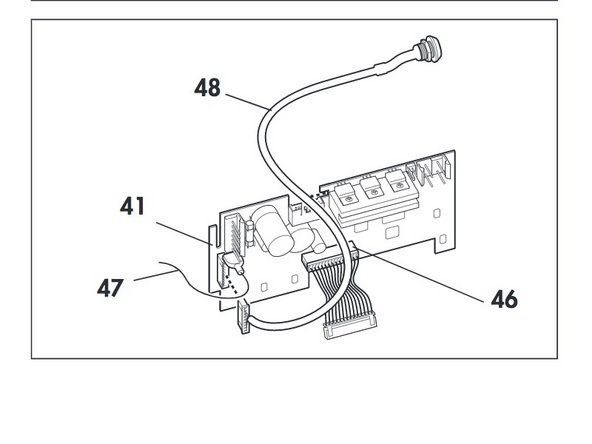
    • Take the rechargeable battery connecting cable (48) out of the groove and disconnect it from the power board (41).

  6. Weinmann VENTImotion and VENTIlogic Power Board Replacement: passo 8, immagine 1 di 1
    • Disconnect the cables of the old power board and plug them into the appropriate slots of the new power board 41:

    • –power board/control board connecting cable (46)

    • –rechargeable battery connecting cable (48)

    • –earth cable (47)

  7. Weinmann VENTImotion and VENTIlogic Power Board Replacement: passo 9, immagine 1 di 2 Weinmann VENTImotion and VENTIlogic Power Board Replacement: passo 9, immagine 2 di 2
    • Connect the power board/mains supply unit connecting cable (45) to the new power board.

    • Position the new power board in the top part of the housing.

  8. Weinmann VENTImotion and VENTIlogic Power Board Replacement: passo 11, immagine 1 di 1
    • Restore the connections to the control board.

Conclusione

To reassemble your device, follow these instructions in reverse order.

Un'altra persona ha completato questa guida.

Emily Jacobson

Membro da: 04/06/20

288 Reputazione

1 Guida realizzata

Team

Cal Poly, Team S7-G19, Paton Spring 2020 Membro di Cal Poly, Team S7-G19, Paton Spring 2020

CPSU-PATON-S20S7G19

3 Membri

4 Guide realizzate

0Commenti sulla guida

Aggiungi Commento

Visualizza Statistiche:

Ultime 24 Ore: 0

Ultimi 7 Giorni: 4

Ultimi 30 Giorni: 8

Tutti i Tempi: 211