Salta al contenuto principale
Unisciti alla Community delle riparazioni - Crea un account

Vtech Kidizoom Smart Watch DX Master Switch Replacement

Cosa ti serve

  1. Vtech Kidizoom Smart Watch DX Master Switch Replacement, Master Switch: passo 1, immagine 1 di 1
    • Make sure the master switch is "OFF" before disassembly, to avoid an electric shock.

    • Flip the watch over with the back facing up.

    Chiedi a FixBot
  2. Vtech Kidizoom Smart Watch DX Master Switch Replacement: passo 2, immagine 1 di 1
    • Remove the four 6.0 mm screws on the back plate with the Phillips #00 screwdriver.

    Chiedi a FixBot
  3. Vtech Kidizoom Smart Watch DX Master Switch Replacement: passo 3, immagine 1 di 1
    • Gently pull the back plate from the watch casing.

    Chiedi a FixBot
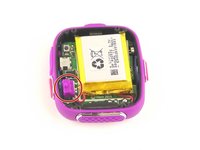
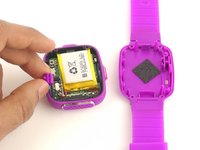
  4. Vtech Kidizoom Smart Watch DX Master Switch Replacement: passo 4, immagine 1 di 2 Vtech Kidizoom Smart Watch DX Master Switch Replacement: passo 4, immagine 2 di 2
    • Lift the master switch from the circuit board.

    Chiedi a FixBot
Conclusione

To reassemble your device, follow these instructions in reverse order.

Altre 6 persone hanno completato questa guida.

Team

USF Tampa, Team 10-6, Remmell Spring 2016 Membro di USF Tampa, Team 10-6, Remmell Spring 2016

USFT-REMMELL-S16S10G6

4 Membri

12 guide realizzate

0Commenti sulla guida

Aggiungi Commento

Visualizza Statistiche:

Ultime 24 Ore: 3

Ultimi 7 Giorni: 13

Ultimi 30 Giorni: 87

Tutti i Tempi: 7,663