Salta al contenuto principale
Unisciti alla Community delle riparazioni - Crea un account

Thrustmaster T3PM Maintenance

Cosa ti serve

  1. Thrustmaster T3PM Maintenance, Disconnect the pedal heads: passo 1, immagine 1 di 2 Thrustmaster T3PM Maintenance, Disconnect the pedal heads: passo 1, immagine 2 di 2
    • Unscrew all 6 screws from the pedal heads

    • Note the positioning of the pedal heads or take this opportunity to try out new position

    • Before starting, unplug your T3PM.

  2. Thrustmaster T3PM Maintenance, Remove screws from the bottom: passo 2, immagine 1 di 1
    • Using Phillips screwdriver remove all screws at the bottom.

  3. Thrustmaster T3PM Maintenance, Remove the top cover: passo 3, immagine 1 di 1
    • Remove the top cover and put it aside

    • Clean off any dust, residue, pet hair and other foreign debris that has accumulated inside the pedal set.

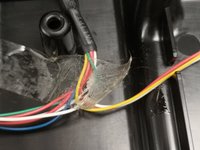
  4. Thrustmaster T3PM Maintenance, Inspect the wires and tape.: passo 5, immagine 1 di 2 Thrustmaster T3PM Maintenance, Inspect the wires and tape.: passo 5, immagine 2 di 2
    • Make sure that the wires and the main cable are secure.

    • Replace sticky tape if necessary.

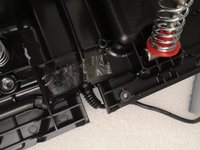
  5. Thrustmaster T3PM Maintenance, Thoroughly clean each pedal.: passo 6, immagine 1 di 1
    • Clean off any dust, residue, pet hair etc from the pedals themselves, near the sensors and springs.

    • Make sure to clean off the extremities of the pedals.

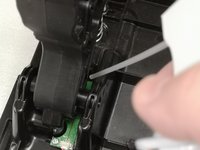
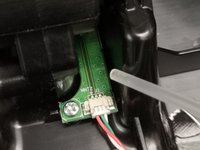
  6. Thrustmaster T3PM Maintenance, Clean the sensors: passo 7, immagine 1 di 2 Thrustmaster T3PM Maintenance, Clean the sensors: passo 7, immagine 2 di 2
    • Using an air-blower, compressed air-can or other tool, clean the sensors.

    • Be cautions as to not damage the sensors, wires or the connectors.

    • Watch out for Electro-static Discharge. Make sure not to touch the sensors or use anti-static wrist strap.

  7. Thrustmaster T3PM Maintenance, Inspect the springs.: passo 8, immagine 1 di 1
    • Inspect the conditions of the gas and clutch springs.

    • Re-lubricate if necessary.

Conclusione

To reassemble your device, follow the steps 1,2,3 in reverse order.

Formica Fusca

Membro da: 08/01/24

2.600 Reputazione

15 Guide realizzate

0Commenti sulla guida

Aggiungi Commento

Visualizza Statistiche:

Ultime 24 Ore: 2

Ultimi 7 Giorni: 12

Ultimi 30 Giorni: 74

Tutti i Tempi: 1,275