Questa traduzione è stata generata automaticamente e non è stata ancora revisionata da una persona. Parli questa lingua? Dai un’occhiata.

Sostituzione scheda madre Ring Video Doorbell Pro

Ultimo aggiornamento il 16 ago 2026
Visualizzazioni: 11.226
Visualizza statistiche:
- Ultime 24 ore:
- 3
- Ultimi 7 giorni:
- 20
- Ultimi 30 giorni:
- 108
- Tutti i Tempi:
- 11.226
Commenti: 8
4 commenti sui passaggi, 4 commenti sulla guida.
Vai ai commenti della guidaCompletato: 10 11
10 persone hanno contrassegnato questa guida come "completata". Sarai il prossimo?
11 persone hanno contrassegnato questa guida come "completata". Compreso te, ottimo lavoro!
Preferiti: 0 1
Nessuno ha preferito (e si è iscritto) questa guida. Sarai il primo?
1 persona ha aggiunto ai preferiti (e si è iscritta a) questa guida, e sei tu!
Introduzione
Vai al passo 1 ↓Questa guida mostra come sostituire la scheda madre del Ring Video Doorbell Pro.
Cosa ti serve
Strumenti


-
-
-
Inizia usando l'estremità a stella del cacciavite incluso nel Ring per svitare le cinque viti da 5 mm sotto il dispositivo.
 Chiedi a FixBot
-
-
-
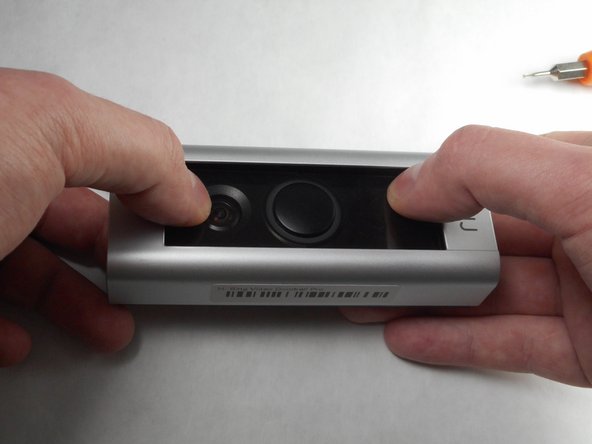
Usa i pollici per fare pressione verso il basso sulla parte in vetro del dispositivo mentre tiri la piastra anteriore verso l'alto e la rimuovi dal dispositivo.
-
-
-
Usando un cacciavite a croce Phillips #000, svita e metti da parte le quattro viti da 5,25 mm.
-
-
-
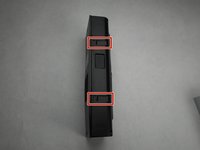
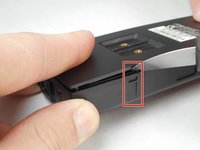
Usando uno strumento in plastica per fare leva, fai leva lungo il bordo del dispositivo. Mentre fai ciò, concentrati sui quattro ganci, due su ogni lato del dispositivo.
-
-
-
Rimuovi la parte anteriore del dispositivo dalla piastra posteriore.
-
-
-
-
-
-
Con il Video Doorbell Pro aperto, l'altoparlante è esposto.
-
-
-
Rimuovi questo collegamento del cablaggio facendo leva delicatamente con un utensile di apertura in plastica.
-
-
-
-
-
Il passaggio successivo consiste nel rimuovere le ultime quattro connessioni che fissano la scheda madre in posizione.
-
-
-
Utilizzando la leva in plastica, rimuovi con attenzione questo collegamento del cablaggio.
-
-
-
Usando la leva in plastica, estrai delicatamente questo cavo a nastro dalla sua porta.
-
-
-
Rimuovi gli ultimi due collegamenti del cablaggio mostrati qui usando gli stessi metodi utilizzati nei passaggi precedenti.
-
-
-
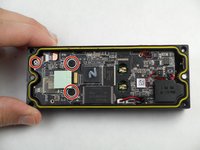
Usando il cacciavite a croce Phillips 000, rimuovi queste tre viti a croce Phillips da 4,25 mm.
-
-
-
Estrai la scheda madre dall'alloggiamento. Sollevala lentamente durante questa operazione per assicurarti che il cablaggio e il delicato cavo a nastro non vengano danneggiati.
-
-





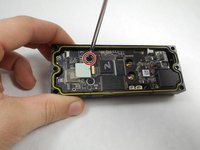

Per rimontare il dispositivo, inserisci la nuova scheda madre e segui queste istruzioni in ordine inverso.
Annulla: non ho completato questa guida.
Altre 10 persone hanno completato questa guida.

Team

IUPUI, Team S7-G4, Baechle Fall 2017 Membro di IUPUI, Team S7-G4, Baechle Fall 2017
IUPUI-BAECHLE-F17S7G4
3 Membri
48 guide realizzate
4Commenti sulla guida
A pig to get apart. Prying the case open needed a glaziers flexy putty knife or spark plug feeler gauge as a plastic pry tool is not man enough . Connectors fall apart as you try to disconnect. Battery, aerial and capacitor are all glued or taped together.
You don’t need to disconnect the ribbon cable in Step 10 unless you intend to remove the camera module, which is screwed to the motherboard so comes away with it
thank you very useful - question is i cannot fine a spare main board im after a ring pro mainboard - i open mine and looks like some of the parts are blowen its all green :) do you offer a repair service of main board ?
