Questa traduzione è stata generata automaticamente e non è stata ancora revisionata da una persona. Parli questa lingua? Dai un’occhiata.

Sostituzione del condensatore del Ring Video Doorbell Pro

Ultimo aggiornamento il 16 ago 2026
Visualizzazioni: 12.915
Visualizza statistiche:
- Ultime 24 ore:
- 7
- Ultimi 7 giorni:
- 26
- Ultimi 30 giorni:
- 102
- Tutti i Tempi:
- 12.915
Commenti: 13
5 commenti sui passaggi, 8 commenti sulla guida.
Vai ai commenti della guidaCompletato: 5 6
5 persone hanno contrassegnato questa guida come "completata". Sarai il prossimo?
6 persone hanno contrassegnato questa guida come "completata". Compreso te, ottimo lavoro!
Preferiti: 2 3
2 persone hanno aggiunto ai preferiti (e si sono iscritte a) questa guida. Sarai il prossimo?
3 persone hanno aggiunto ai preferiti (e si sono iscritte a) questa guida, incluso te!
Introduzione
Vai al passo 1 ↓Questa guida fornisce passaggi dettagliati su come sostituire il condensatore nel Ring Video Doorbell Pro.
Cosa ti serve
Strumenti


-
-
-
Inizia usando l'estremità a stella del cacciavite incluso nel Ring per svitare le cinque viti da 5 mm sotto il dispositivo.
 Chiedi a FixBot
-
-
-
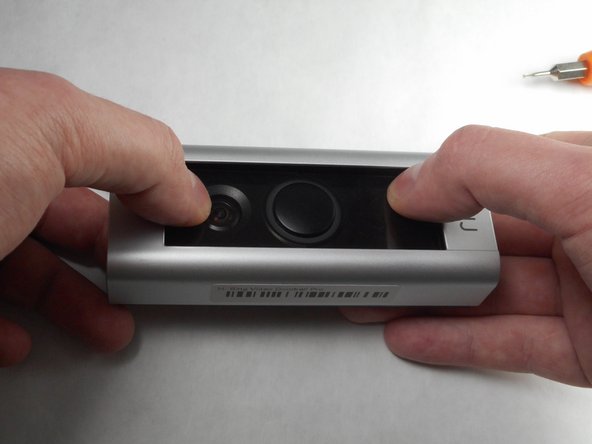
Usa i pollici per fare pressione verso il basso sulla parte in vetro del dispositivo mentre tiri la piastra anteriore verso l'alto e la rimuovi dal dispositivo.
-
-
-
Usando un cacciavite a croce Phillips #000, svita e metti da parte le quattro viti da 5,25 mm.
-
-
-
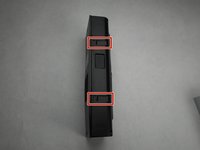
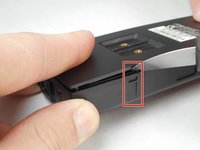
Usando uno strumento in plastica per fare leva, fai leva lungo il bordo del dispositivo. Mentre fai ciò, concentrati sui quattro ganci, due su ogni lato del dispositivo.
-
-
-
Rimuovi la parte anteriore del dispositivo dalla piastra posteriore.
-
-
-
-
-
Con il Video Doorbell Pro aperto, l'altoparlante è esposto.
-
-
-
-
Rimuovi questo collegamento del cablaggio facendo leva delicatamente con un utensile di apertura in plastica.
-
-
-
-
-
Il passaggio successivo consiste nel rimuovere le ultime quattro connessioni che fissano la scheda madre in posizione.
-
-
-
Utilizzando la leva in plastica, rimuovi con attenzione questo collegamento del cablaggio.
-
-
-
Usando la leva in plastica, estrai delicatamente questo cavo a nastro dalla sua porta.
-
-
-
Rimuovi gli ultimi due collegamenti del cablaggio mostrati qui usando gli stessi metodi utilizzati nei passaggi precedenti.
-
-
-
Usando il cacciavite a croce Phillips 000, rimuovi queste tre viti a croce Phillips da 4,25 mm.
-
-
-
Estrai la scheda madre dall'alloggiamento. Sollevala lentamente durante questa operazione per assicurarti che il cablaggio e il delicato cavo a nastro non vengano danneggiati.
-
-
-





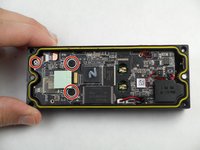
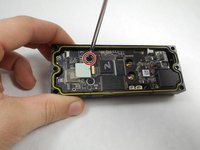


Per rimontare il dispositivo, inserisci il nuovo condensatore e segui queste istruzioni in ordine inverso.
Annulla: non ho completato questa guida.
Altre 5 persone hanno completato questa guida.

Team

IUPUI, Team S7-G4, Baechle Fall 2017 Membro di IUPUI, Team S7-G4, Baechle Fall 2017
IUPUI-BAECHLE-F17S7G4
3 Membri
48 guide realizzate
8Commenti sulla guida
where can I buy the replacement capacitor please or is it a case of buying a standard and making up the lead?
is that a battery right next to it? why didn’t you pull/mention that also?
I have the ring pro. What is the battery specification and what is the capacitor specification? If I going to all that work I need the replacement parts on hand.
The capacitor is a 470 uF/ 50 VDC electrolytic capacitor.
Battery is 350 mAh 3.7 volt Li 602030.
602030 battery listing: https://www.aliexpress.com/item/33029703...
