Questa traduzione è stata generata automaticamente e non è stata ancora revisionata da una persona. Parli questa lingua? Dai un’occhiata.

Sostituzione batteria Samsung Galaxy Tab 10.1

Ultimo aggiornamento il 14 ago 2026
Visualizzazioni: 364.164
Visualizza statistiche:
- Ultime 24 ore:
- 6
- Ultimi 7 giorni:
- 33
- Ultimi 30 giorni:
- 179
- Tutti i Tempi:
- 364.164
Commenti: 43
23 commenti sui passaggi, 20 commenti sulla guida.
Vai ai commenti della guidaCompletato: 61 62
61 persone hanno contrassegnato questa guida come "completata". Sarai il prossimo?
62 persone hanno contrassegnato questa guida come "completata". Compreso te, ottimo lavoro!
Preferiti: 25 26
25 persone hanno aggiunto ai preferiti (e si sono iscritte a) questa guida. Sarai il prossimo?
26 persone hanno aggiunto ai preferiti (e si sono iscritte a) questa guida, incluso te!
Introduzione
Vai al passo 1 ↓In questa guida imparerai a sostituire la batteria del tuo Samsung Galaxy Tab 10.1. Avere una batteria danneggiata o guasta può essere frustrante. Ci sono un paio di guida prerequisita da completare prima!
Cosa ti serve
Ricambi

Strumenti


-
-
Strumento utilizzato in questo passaggio:Tweezers$4.99
-
Posiziona la parte inferiore del tablet rivolta verso di te.
-
Rimuovi le viti da 4,1 mm vicino alla porta di ricarica con un cacciavite Tri-Wing.
-
Se sono presenti delle coperture in plastica sopra queste viti, usa delle pinzette a punta per rimuovere le coperture.
 Chiedi a FixBot
-
-
-
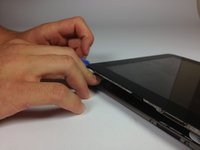
Inizia dal centro del lato sinistro e inserisci uno strumento di apertura tra il pannello posteriore e il gruppo pannello frontale.
-
Fai scorrere con attenzione lo strumento di apertura lungo il bordo sinistro e superiore per separare il pannello posteriore dal resto del dispositivo.
-
-
-
-
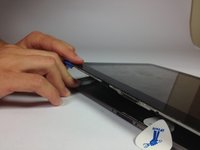
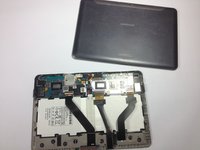
Utilizzando gli strumenti di apertura in plastica, continua a passare con attenzione lungo il bordo destro e inferiore, quindi solleva lo schermo dal pannello posteriore.
-
-
-
-
-
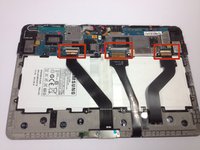
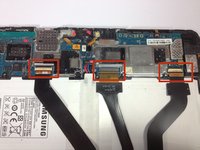
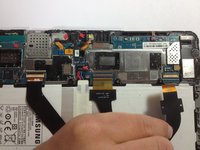
Solleva le alette di bloccaggio sui connettori ZIF che fissano i tre grandi cavi a nastro.
-
Estrai con cura i tre cavi a nastro dalle loro prese sulla scheda madre.
-
-
-
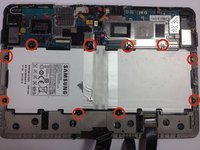
Rimuovi le dieci viti a croce Phillips #00 da 3 mm attorno alla batteria.
-
-
-
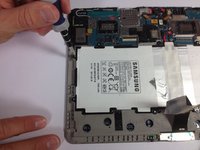
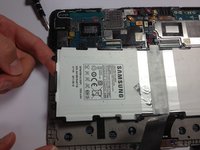
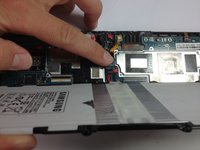
Solleva il bordo della batteria con il dito o con uno spudger.
-
Stacca la batteria tenendo premuta la scheda madre mentre sollevi delicatamente la batteria.
-
-








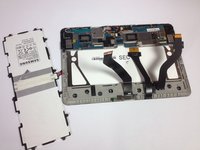
Per rimontare il dispositivo, segui queste istruzioni in ordine inverso.
Annulla: non ho completato questa guida.
Altre 61 persone hanno completato questa guida.

Team

Cal Poly, Team 13-5, Forte Fall 2013 Membro di Cal Poly, Team 13-5, Forte Fall 2013
CPSU-FORTE-F13S13G5
5 Membri
72 guide realizzate
20Commenti sulla guida
Those 3 plastic bands with connectors at the end are a really poor design and a drag to put back on correctly : there's a little white line drawn on each one that needs to be aligned with a line drawn on the socket itself. This means you really have to push them back in (with a little platic tool for example). If not you can have a non functioning screen or no touch detection.
What would be the correct battery that is suitable for the Tab proT520? I can't find any reference to this particular models battery..
good jobs man
Nice tutorials, thank you! I want to ask you about exactly battery. Where is it better to order it/ I mean, if i order it online? I live in Europe and know some stores of hardware, such as hardware.nu and so on but also i know such stores as Amazon and eBay also Aliexpress..Tell me where is quaity is the best?
