Questa traduzione è stata generata automaticamente e non è stata ancora revisionata da una persona. Parli questa lingua? Dai un’occhiata.

Sostituzione batteria Dell Inspiron 15z-5523

Ultimo aggiornamento il 2 ago 2026
Visualizzazioni: 4431
Visualizza statistiche:
- Ultime 24 ore:
- 3
- Ultimi 7 giorni:
- 24
- Ultimi 30 giorni:
- 80
- Tutti i Tempi:
- 4.431
Commenti: 4
2 commenti sui passaggi, 2 commenti sulla guida.
Vai ai commenti della guidaCompletato: 1 2
1 persona ha contrassegnato questa guida come "completata". Sarai il prossimo?
2 persone hanno contrassegnato questa guida come "completata". Compreso te, ottimo lavoro!
Preferiti: 0 1
Nessuno ha preferito (e si è iscritto) questa guida. Sarai il primo?
1 persona ha aggiunto ai preferiti (e si è iscritta a) questa guida, e sei tu!
Attrezzi Non Corretti
Contribuisci a rendere migliore questa guida usando i giusti strumenti nelle immagini e/o nel testo.
Introduzione
Vai al passo 1 ↓Questo tutorial descrive la procedura di sostituzione della batteria di un Dell Inspiron 15z-5523. Come per tutte le batterie dopo numerosi cicli di carica e scarica, la batteria inizierà col tempo a perdere la capacità di mantenere la carica. Più la batteria è vecchia, più è probabile che inizi a mostrare questo deterioramento delle prestazioni.
Cosa ti serve


-
-
-
Rimuovi tutti i tappi in gomma e le viti dal retro del portatile
 Chiedi a FixBot
-
-
-
Stacca la tastiera dal portatile
-
Svita le 4 viti sul telaio metallico (cerchi gialli)
-
Scollega le 4 connessioni dati (frecce color ottanio)
-
-
-
-
Rimuovi il telaio superiore del computer
-
-
-
Rimuovi le 5 viti che fissano la vecchia batteria
-
Solleva delicatamente la batteria ed estraila
-
-


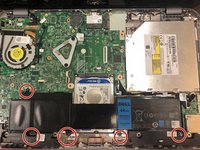
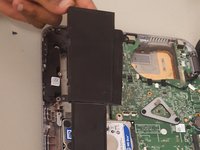
Per rimontare il dispositivo, segui queste istruzioni in ordine inverso.
Annulla: non ho completato questa guida.
Un'altra persona ha completato questa guida.

Team

Western Carolina University, Team S1-G5, Virtue Spring 2018 Membro di Western Carolina University, Team S1-G5, Virtue Spring 2018
WCU-VIRTUE-S18S1G5
4 Membri
60 guide realizzate
2Commenti sulla guida
Excellent, Easy to follow and helpful graphics. Thanks
Hi Christian,
Would you happen to know what are the specs for the seven screws in the base of the Inspiron 15z 5523? Mine is exactly like the one in your post for replacing the battery. I lost mine when replacing the fan. Dell won’t help because the machine is out of warranty. Any ideas would be appreciated.
Thanks Christian.
David
