Questa traduzione è stata generata automaticamente e non è stata ancora revisionata da una persona. Parli questa lingua? Dai un’occhiata.

Sostituzione SSD Asus Eee PC 900

Brian Carreon e 8 altri collaboratori
Ultimo aggiornamento il 2 ago 2026
Visualizzazioni: 47.163
Visualizza statistiche:
- Ultime 24 ore:
- 5
- Ultimi 7 giorni:
- 36
- Ultimi 30 giorni:
- 154
- Tutti i Tempi:
- 47.163
Commenti: 9
4 commenti sui passaggi, 5 commenti sulla guida.
Vai ai commenti della guidaCompletato: 8 9
8 persone hanno contrassegnato questa guida come "completata". Sarai il prossimo?
9 persone hanno contrassegnato questa guida come "completata". Compreso te, ottimo lavoro!
Preferiti: 12 13
12 persone hanno aggiunto ai preferiti (e si sono iscritte a) questa guida. Sarai il prossimo?
13 persone hanno aggiunto ai preferiti (e si sono iscritte a) questa guida, incluso te!
Introduzione
Vai al passo 1 ↓L'Asus Eee PC 900 utilizza un'unità a stato solido di piccole dimensioni invece di un hard disk più grande. Usa questa guida per sostituire l'SSD dell'Asus Eee PC 900.
Cosa ti serve
Strumenti


-
-
-
Fai scorrere le linguette di blocco della batteria dalla posizione di blocco a quella di sblocco.
 Chiedi a FixBot
-
-
-
Fai scorrere la batteria verso l'esterno tenendo la linguetta di blocco sinistra in posizione di sblocco.
-
-
-
-
-
-
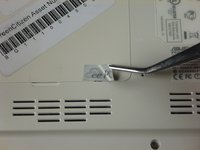
Rimuovi il piccolo adesivo sul lato destro della copertura del vano SSD/RAM.
-
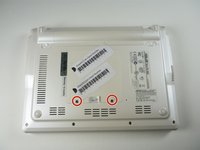
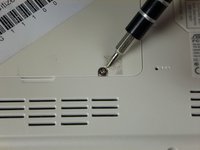
Rimuovi le due viti a croce Phillips da 4,76 mm che fissano la copertura del vano SSD/RAM.
-
-
-
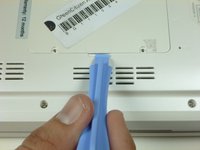
Usando uno strumento di apertura in plastica, solleva la parte inferiore della copertura dello scomparto SSD/RAM.
-
Solleva la copertura allontanandola dal portatile.
-
-
-
Rimuovi le due viti a croce Phillips da 4,76 mm che fissano l'SSD.
-
Fai scorrere l'SSD fuori dalla sua presa e sollevalo per estrarlo dal vano.
-
-




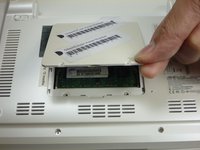


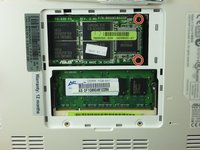
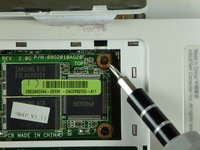
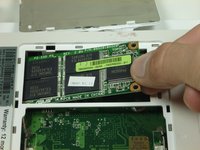
Per rimontare il dispositivo, segui queste istruzioni in ordine inverso.
Annulla: non ho completato questa guida.
Altre 8 persone hanno completato questa guida.

Team

Cal Poly, Team 3-27, Amido Winter 2012 Membro di Cal Poly, Team 3-27, Amido Winter 2012
CPSU-AMIDO-W12S3G27
4 Membri
96 guide realizzate
5Commenti sulla guida
Refering from this site: http://www.minipciessd.com/
It seems you'll need a miniPCIe SSD and not a m-sata (even if the form factor seems the same) and that's why your bios doesn't recognize it.
Same problem here. I ended up putting my “new!” 64GB SSD in an adaptor and used it for a few years until it wore out!
Evidently the chips aren’t much good as withstood less than 700GB of writes according to the onboard diagnostics.
Strangely enough the adaptor worked with the original 16GB SSD and the 64.
what kind of adapter you use? My ssd died….
