Salta al contenuto principale
Unisciti alla Community delle riparazioni - Crea un account

Sony Xperia TL Display Assembly Replacement

Cosa ti serve

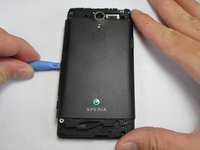
  1. Sony Xperia TL Display Assembly Replacement, Remove Top Plastic Section: passo 1, immagine 1 di 3 Sony Xperia TL Display Assembly Replacement, Remove Top Plastic Section: passo 1, immagine 2 di 3 Sony Xperia TL Display Assembly Replacement, Remove Top Plastic Section: passo 1, immagine 3 di 3
    • Use the plastic opening tool to pry the top plastic section off.

    Chiedi a FixBot
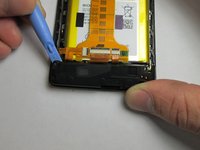
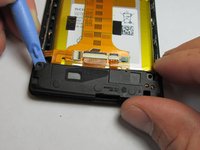
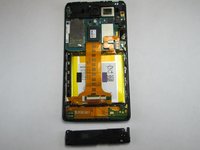
  2. Sony Xperia TL Display Assembly Replacement, Remove Bottom Plastic Section: passo 2, immagine 1 di 2 Sony Xperia TL Display Assembly Replacement, Remove Bottom Plastic Section: passo 2, immagine 2 di 2
    • Use the plastic opening tool to pry the bottom plastic section off.

    Chiedi a FixBot
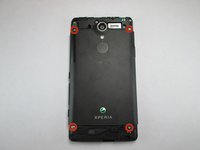
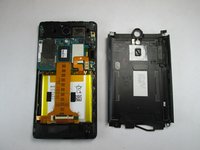
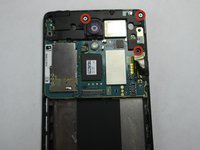
  3. Sony Xperia TL Display Assembly Replacement, Unscrewing the Back Off: passo 3, immagine 1 di 3 Sony Xperia TL Display Assembly Replacement, Unscrewing the Back Off: passo 3, immagine 2 di 3 Sony Xperia TL Display Assembly Replacement, Unscrewing the Back Off: passo 3, immagine 3 di 3
    • Remove the four 5mm screws.

    • Use the plastic opening tool to pry off the back.

    Chiedi a FixBot
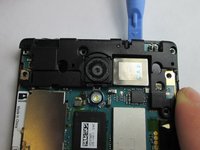
  4. Sony Xperia TL Display Assembly Replacement, Loud Speaker: passo 4, immagine 1 di 3 Sony Xperia TL Display Assembly Replacement, Loud Speaker: passo 4, immagine 2 di 3 Sony Xperia TL Display Assembly Replacement, Loud Speaker: passo 4, immagine 3 di 3
    • Use the plastic opening tool to remove the loud speaker module.

    Chiedi a FixBot
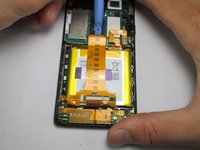
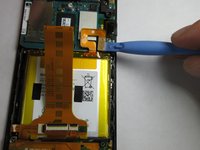
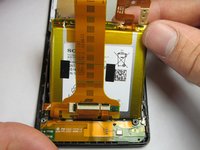
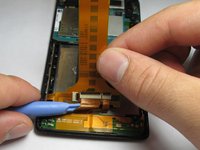
  5. Sony Xperia TL Display Assembly Replacement, Battery: passo 5, immagine 1 di 3 Sony Xperia TL Display Assembly Replacement, Battery: passo 5, immagine 2 di 3 Sony Xperia TL Display Assembly Replacement, Battery: passo 5, immagine 3 di 3
    • Use the plastic opening tool to detach the ribbon running across the battery.

    • Use the plastic opening tool to detach the ribbon connecting the battery to the motherboard.

    Chiedi a FixBot
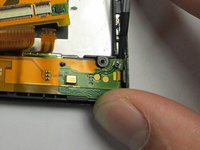
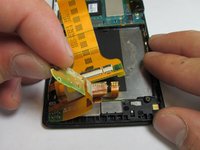
  6. Sony Xperia TL Display Assembly Replacement, Battery Harness: passo 6, immagine 1 di 3 Sony Xperia TL Display Assembly Replacement, Battery Harness: passo 6, immagine 2 di 3 Sony Xperia TL Display Assembly Replacement, Battery Harness: passo 6, immagine 3 di 3
    • Unhook the 2 connections between the harness and phone shell.

    • Using the plastic opening tool, pry the harness up and remove it.

    • There is an adhesive on the bottom half of the battery harness.

    Chiedi a FixBot
  7. Sony Xperia TL Display Assembly Replacement: passo 7, immagine 1 di 1
    • The final step is taking the entire harness off of the phone.

    Chiedi a FixBot
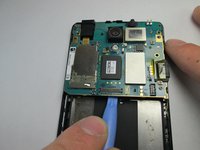
  8. Sony Xperia TL Display Assembly Replacement, Motherboard: passo 8, immagine 1 di 3 Sony Xperia TL Display Assembly Replacement, Motherboard: passo 8, immagine 2 di 3 Sony Xperia TL Display Assembly Replacement, Motherboard: passo 8, immagine 3 di 3
    • Use the Phillips #00 to remove the 3 5mm screws.

    • Lift the plastic cover off.

    • Use the plastic opening tool to pry the motherboard out of the phone shell.

    Chiedi a FixBot
  9. Sony Xperia TL Display Assembly Replacement, Ear Speaker: passo 9, immagine 1 di 1
    • Use the plastic opening tool to detach the ear piece speaker.

    • Avoid majorly bending the tiny metal hooks holding the ear piece in.

    Chiedi a FixBot
  10. Sony Xperia TL Display Assembly Replacement, Display Assembly: passo 10, immagine 1 di 1
    • Once every single piece is removed from the main screen/digitizer this will be the only remaining piece. Nothing else can be removed. If you need to replace your screen this entire piece must be replaced.

    Chiedi a FixBot
Conclusione

To reassemble your device, follow these instructions in reverse order.

Un'altra persona ha completato questa guida.

Adam Giniger

Membro da: 09/22/14

1.303 Reputazione

8 guide realizzate

Team

USF Tampa, Team 4-4, Brown Fall 2014 Membro di USF Tampa, Team 4-4, Brown Fall 2014

USFT-BROWN-F14S4G4

3 Membri

10 guide realizzate

0Commenti sulla guida

Aggiungi Commento

Visualizza statistiche:

Ultime 24 ore: 0

Ultimi 7 giorni: 4

Ultimi 30 giorni: 56

Tutti i Tempi: 826