Salta al contenuto principale
Unisciti alla Community delle riparazioni - Crea un account

Solio Xcellerator and Hub Battery Pack and Solar Charger Battery Replacement

Cosa ti serve

  1. Solio Xcellerator and Hub Battery Pack and Solar Charger Battery Replacement, Battery: passo 1, immagine 1 di 1
    • With all other devices unplugged, flip the Charger Hub over so that the grey side with the screw is face up.

    • Take out the PH000 bit from your 26 Bit Driver Kit and attach it to the screw driver.

    Chiedi a FixBot

    Aggiungi Commento

  2. Solio Xcellerator and Hub Battery Pack and Solar Charger Battery Replacement: passo 2, immagine 1 di 1
    • Use the screwdriver to remove the lone screw.

    Chiedi a FixBot

    Aggiungi Commento

  3. Solio Xcellerator and Hub Battery Pack and Solar Charger Battery Replacement: passo 3, immagine 1 di 1
    • Once the screw has been fully loosened, pull it out and place it to the side. Be careful not to lose it!

    Chiedi a FixBot

    Aggiungi Commento

  4. Solio Xcellerator and Hub Battery Pack and Solar Charger Battery Replacement: passo 4, immagine 1 di 1
    • Without pushing too hard, slightly lift the side of the gray bottom panel that was screwed down (the far side in this picture).

    • Do not force the whole gray bottom panel off, as it is not ready to come off yet!

    Chiedi a FixBot

    Aggiungi Commento

  5. Solio Xcellerator and Hub Battery Pack and Solar Charger Battery Replacement: passo 5, immagine 1 di 1
    • If you are having difficulty pushing the gray bottom panel up, use the Plastic Opening Tools for assistance.

    • Do not bend the gray bottom panel completely up, as a clip is still holding it in place on the other side of the Charger Hub! Excessive bending may damage the device.

    Chiedi a FixBot

    Aggiungi Commento

  6. Solio Xcellerator and Hub Battery Pack and Solar Charger Battery Replacement: passo 6, immagine 1 di 1
    • To fully remove the gray bottom panel, it must be slid out of place to release it from the internal sealing methods. Push/slide the grey bottom panel to the left given the orientation presented in the picture.

    Chiedi a FixBot

    Aggiungi Commento

  7. Solio Xcellerator and Hub Battery Pack and Solar Charger Battery Replacement: passo 7, immagine 1 di 1
    • Fully remove the gray bottom panel. The insides of the Charger Hub should now be fully exposed as shown.

    Chiedi a FixBot

    Aggiungi Commento

  8. Solio Xcellerator and Hub Battery Pack and Solar Charger Battery Replacement: passo 8, immagine 1 di 1
    • Using the Phillips bit PH1 from the 26 Bit Driver Kit, remove the three screws keeping the orange battery cover held in place. Keep track of these screws as well; they are not the same type of screw used to secure the bottom gray panel.

    • This part will take patience, as the PH1 bit may not fit perfectly within the threads of the screws. Applying a firm amount of pressure while unscrewing makes this process easier.

    Chiedi a FixBot

    Aggiungi Commento

  9. Solio Xcellerator and Hub Battery Pack and Solar Charger Battery Replacement: passo 9, immagine 1 di 1
    • Simply lift up the orange battery cover and place it to the side.

    Chiedi a FixBot

    Aggiungi Commento

  10. Solio Xcellerator and Hub Battery Pack and Solar Charger Battery Replacement: passo 10, immagine 1 di 1
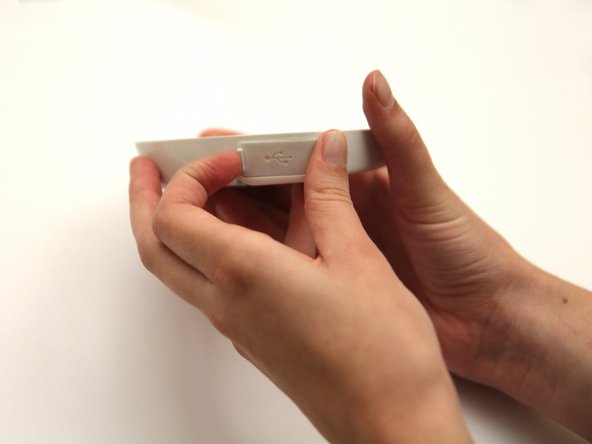
    • Before moving to remove the circuit board, pull out the USB port protector. This will allow the circuit board to be removed without conflict.

    Chiedi a FixBot

    Aggiungi Commento

  11. Solio Xcellerator and Hub Battery Pack and Solar Charger Battery Replacement: passo 11, immagine 1 di 1
    • The USB port hub protector should be removed as shown.

    Chiedi a FixBot

    Aggiungi Commento

  12. Solio Xcellerator and Hub Battery Pack and Solar Charger Battery Replacement: passo 12, immagine 1 di 1
    • Be careful! You are working with a delicate circuit board, so you want to make sure you do not force any movements.

    • The battery is attached to the circuit board via wires, so you must remove both at once.

    • Place the Plastic Opening Tool underneath the circuit board and lift the circuit board up so that it becomes loosened.

    Chiedi a FixBot

    Aggiungi Commento

  13. Solio Xcellerator and Hub Battery Pack and Solar Charger Battery Replacement: passo 13, immagine 1 di 1
    • Remove the circuit board and the battery from the plastic casing.

    Chiedi a FixBot

    Aggiungi Commento

  14. Solio Xcellerator and Hub Battery Pack and Solar Charger Battery Replacement: passo 14, immagine 1 di 1
    • This step will require some force, but be careful not to over stress the circuit board, as you do not want to break it!

    • Pull the white base of the wires out of the white port on the circuit board.

    Chiedi a FixBot

    Aggiungi Commento

  15. Solio Xcellerator and Hub Battery Pack and Solar Charger Battery Replacement: passo 15, immagine 1 di 1
    • Now that the battery is removed, you can plug in your new Lithium Polymer Battery - 3.7V 2000mAh into the circuit board.

    • Follow the steps in reverse order using your new battery to put the device back together.

    Chiedi a FixBot

    Aggiungi Commento

Conclusione

To reassemble your device, follow these instructions in reverse order.

Annulla: non ho completato questa guida.

Altre 17 persone hanno completato questa guida.

Karina Uchiumi

Membro da: 10/09/13

274 Reputazione

Una guida realizzata

Team

Cal Poly, Team 8-21, Regan Fall 2012 Membro di Cal Poly, Team 8-21, Regan Fall 2012

CPSU-REGAN-F12S8G21

Membro di 1

1 guide realizzate

1Commento della guida

Please note that the replacement battery is available from Solio here:

http://store.solio.com/Solio-Bolt-Hub-Re...

The battery listed in the direction above does not fit the space, has the wrong connector, and is not the high-temp rated battery required for the extreme conditions of solar charging.

Solio Support - Rispondi Condividi

Aggiungi Commento

Visualizza statistiche:

Ultime 24 ore: 2

Ultimi 7 giorni: 9

Ultimi 30 giorni: 51

Tutti i Tempi: 1,945