Salta al contenuto principale
Unisciti alla Community delle riparazioni - Crea un account

Sanyo VPC-X1200 Main Board Replacement

Cosa ti serve

    1. Sanyo VPC-X1200 Main Board Replacement, Back Case: passo 1, immagine 1 di 3 Sanyo VPC-X1200 Main Board Replacement, Back Case: passo 1, immagine 2 di 3 Sanyo VPC-X1200 Main Board Replacement, Back Case: passo 1, immagine 3 di 3
      • Remove the five case screws with a Phillips #00 Screwdriver.

      • Five 3.5mm Phillips Screws

      Chiedi a FixBot

      Aggiungi Commento

    2. Sanyo VPC-X1200 Main Board Replacement: passo 2, immagine 1 di 1
      • Gently lift up the back cover and set aside.

      Chiedi a FixBot

      Aggiungi Commento

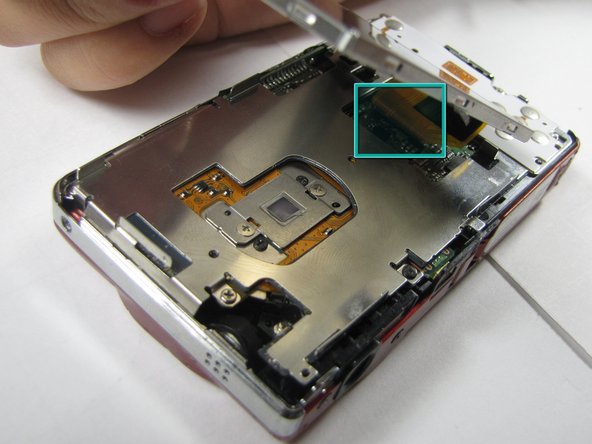
    1. Sanyo VPC-X1200 Main Board Replacement, LCD Screen: passo 3, immagine 1 di 2 Sanyo VPC-X1200 Main Board Replacement, LCD Screen: passo 3, immagine 2 di 2
      • Gently lift up on the left side of the LCD and slowly pull it to the left side of the camera but do not remove entirely, there is a ribbon connector.

      • Be careful not to rip out the ribbon connector.

      Chiedi a FixBot

      Aggiungi Commento

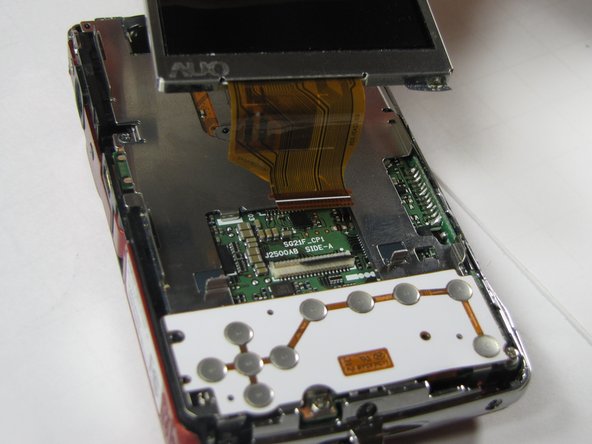
    2. Sanyo VPC-X1200 Main Board Replacement: passo 4, immagine 1 di 2 Sanyo VPC-X1200 Main Board Replacement: passo 4, immagine 2 di 2
      • To clear the ribbon connection underneath the screen, lift up the black ribbon gate with the spudger.

      • Gently lift ribbon out of the gate and set screen aside.

      Chiedi a FixBot

      Aggiungi Commento

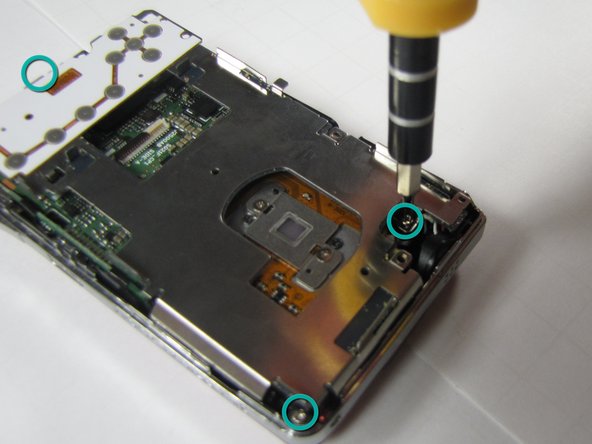
    1. Sanyo VPC-X1200 Main Board Replacement, Button Plate: passo 5, immagine 1 di 2 Sanyo VPC-X1200 Main Board Replacement, Button Plate: passo 5, immagine 2 di 2
      • There are five screws of three different sizes which need removal.

      • One 4.5mm screw

      • Four 3.5mm screws, one on the button side

      • One 5.5mm screws

      Chiedi a FixBot

      Aggiungi Commento

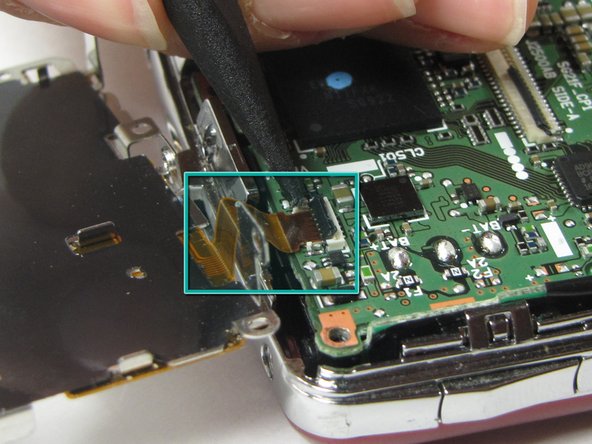
    2. Sanyo VPC-X1200 Main Board Replacement: passo 6, immagine 1 di 2 Sanyo VPC-X1200 Main Board Replacement: passo 6, immagine 2 di 2
      • Slowly lift metal tray to the right.

      • Be careful not to bend the screw tabs or rip out the ribbon cable.

      • Remove ribbon cable by using the spudger to lift up the black ribbon gate to release the ribbon

      Chiedi a FixBot

      Aggiungi Commento

    1. Sanyo VPC-X1200 Main Board Replacement, Lens Unit: passo 7, immagine 1 di 1
      • Disconnect the two ribbon cables from the lens unit by using the spudger to lift the ribbon gates.

      • One gate is black and another is white.

      Chiedi a FixBot

      Aggiungi Commento

    2. Sanyo VPC-X1200 Main Board Replacement: passo 8, immagine 1 di 2 Sanyo VPC-X1200 Main Board Replacement: passo 8, immagine 2 di 2
      • Remove the three silver screws.

      • Three 5.5mm screws

      Chiedi a FixBot

      Aggiungi Commento

    3. Sanyo VPC-X1200 Main Board Replacement: passo 9, immagine 1 di 1
      • Lift the lens unit free of the camera. A spudger can be used to separate the lens unit if necessary.

      Chiedi a FixBot

      Aggiungi Commento

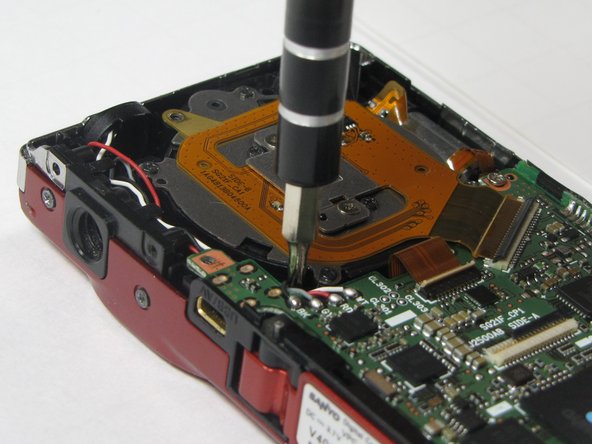
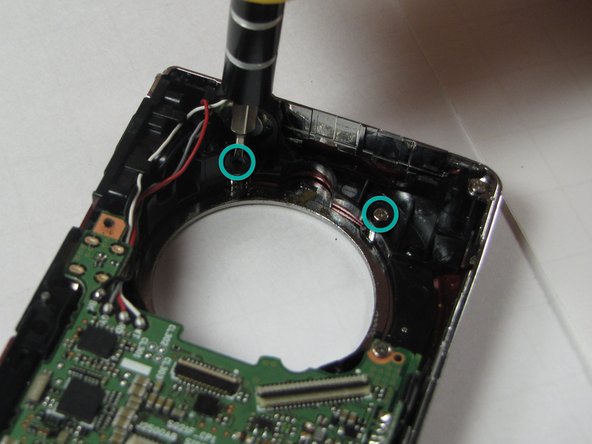
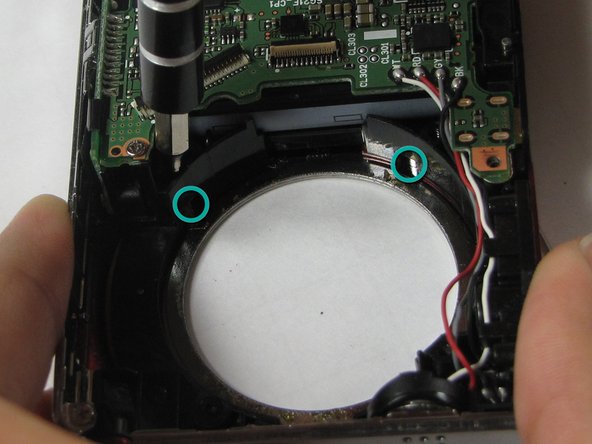
    1. Sanyo VPC-X1200 Main Board Replacement, Flash Lens: passo 10, immagine 1 di 3 Sanyo VPC-X1200 Main Board Replacement, Flash Lens: passo 10, immagine 2 di 3 Sanyo VPC-X1200 Main Board Replacement, Flash Lens: passo 10, immagine 3 di 3
      • Remove 4 screws attached to the exterior silver bezel.

      • Four 3.5mm screws

      Chiedi a FixBot

      Aggiungi Commento

    2. Sanyo VPC-X1200 Main Board Replacement: passo 11, immagine 1 di 1
      • Remove round silver bezel from the front of the camera.

      Chiedi a FixBot

      Aggiungi Commento

    3. Sanyo VPC-X1200 Main Board Replacement: passo 12, immagine 1 di 1
      • Remove the two screws on the bottom of the front cover.

      Chiedi a FixBot

      Aggiungi Commento

    4. Sanyo VPC-X1200 Main Board Replacement: passo 13, immagine 1 di 1
      • Remove tripod mount.

      Chiedi a FixBot

      Aggiungi Commento

    5. Sanyo VPC-X1200 Main Board Replacement: passo 14, immagine 1 di 1
      • Carefully lift off the front cover plate of the camera.

      Chiedi a FixBot

      Aggiungi Commento

    6. Sanyo VPC-X1200 Main Board Replacement: passo 15, immagine 1 di 1
      • Remove the flash lens using the spudger or a finger.

      • It will be attached by a piece of tape, peel the lens off of that piece of tape without removing the tape.

      Chiedi a FixBot

      Aggiungi Commento

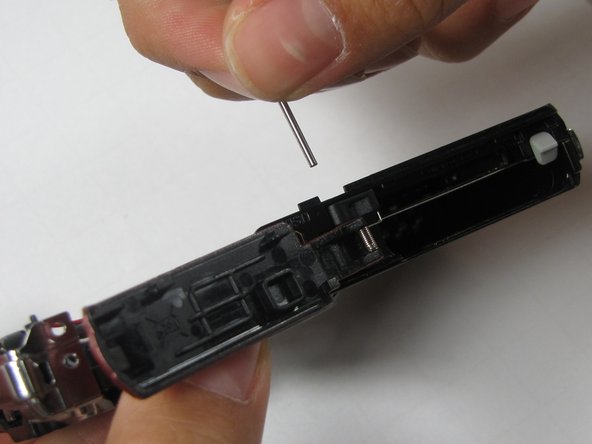
    1. Sanyo VPC-X1200 Main Board Replacement, Main Board: passo 16, immagine 1 di 3 Sanyo VPC-X1200 Main Board Replacement, Main Board: passo 16, immagine 2 di 3 Sanyo VPC-X1200 Main Board Replacement, Main Board: passo 16, immagine 3 di 3
      • Push out pin that holds the door hinge together

      • Pull out the pin. Be careful to keep track of the spring and black spacer.

      • Set the battery door aside

      Chiedi a FixBot

      Aggiungi Commento

Conclusione

To reassemble your device, follow these instructions in reverse order.

Annulla: non ho completato questa guida.

Team

Cal Poly, Team 7-10, Maness Spring 2010 Membro di Cal Poly, Team 7-10, Maness Spring 2010

CPSU-MANESS-S10S7G10

4 Membri

23 guide realizzate

0Commenti sulla guida

Aggiungi Commento

Visualizza statistiche:

Ultime 24 ore: 1

Ultimi 7 giorni: 8

Ultimi 30 giorni: 39

Tutti i Tempi: 2,766