Questa traduzione è stata generata automaticamente e non è stata ancora revisionata da una persona. Parli questa lingua? Dai un’occhiata.
Introduzione
Tutto ciò di cui hai bisogno per questa guida è la volontà di riparare la tua fotocamera. Buon divertimento!
Cosa ti serve
-
-
-
Controlla la presenza di detriti e polvere attorno al pulsante di accensione per assicurarti che sia pulito.
-
Se non c'è polvere, inizia svitando le sette viti Philips da 4 mm del guscio esterno con il cacciavite Philips.
-
Ora fai leva con attenzione per aprire la scocca posteriore con lo strumento di apertura iFixit.
 Chiedi a FixBot
-
-
-
Ora che hai rimosso la cover posteriore, rimuovi delicatamente lo schermo LCD dalla fotocamera.
-
Successivamente, svita le tre viti a croce Phillips da 4 mm sul pannello posteriore con lo stesso cacciavite (vedi immagine).
-
-
Strumento utilizzato in questo passaggio:Tweezers$4.99
-
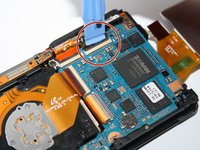
Sgancia i quattro connettori che fissano le strisce di pellicola in rame arancione con lo strumento di apertura iFixit.
-
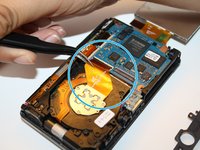
Dopodiché, estrai con attenzione le tre strisce di pellicola con le pinzette iFixit.
-
-
-
-
Rimuovi la vite a croce Phillips da 4 mm situata sopra la striscia di pellicola centrale con il cacciavite Phillips. Questo permetterà al telaio superiore di allentarsi per essere rimosso.
-
-
-
Quindi, con lo strumento di apertura in plastica, tira verso destra l'artiglio nero situato nella parte inferiore destra della fotocamera. Questo elemento tiene bloccata la piastra principale.
-
-
-
Solleva lentamente con le dita il telaio superiore della fotocamera per accedere al pulsante di accensione.
-
-




Per rimontare il dispositivo, segui queste istruzioni in ordine inverso.
Annulla: non ho completato questa guida.
Altre 2 persone hanno completato questa guida.


