Salta al contenuto principale
Unisciti alla Community delle riparazioni - Crea un account

Samsung Galaxy Tab 10.1 Battery Replacement

Cosa ti serve

  1. Samsung Galaxy Tab 10.1 Battery Replacement, Rear Panel: passo 1, immagine 1 di 2 Samsung Galaxy Tab 10.1 Battery Replacement, Rear Panel: passo 1, immagine 2 di 2
    Strumento utilizzato in questo passaggio:
    Tweezers
    $4.99
    • Place the bottom of the tablet towards you.

    • Remove the 4.1mm screws near the charge port with a Tri-Wing screwdriver.

    • If there are plastic tabs covering these screws, use pointed tweezers to pry the tabs out.

    • On model GT-P7500, this step is omitted, as that model doesn't have these 2 screws.

    Chiedi a FixBot

    Aggiungi Commento

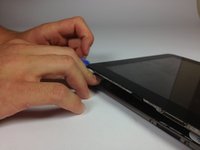
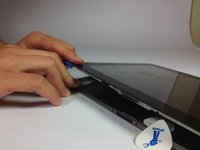
  2. Samsung Galaxy Tab 10.1 Battery Replacement: passo 2, immagine 1 di 3 Samsung Galaxy Tab 10.1 Battery Replacement: passo 2, immagine 2 di 3 Samsung Galaxy Tab 10.1 Battery Replacement: passo 2, immagine 3 di 3
    • Start in the middle of the left side and insert a plastic opening tool between the rear panel and the front panel assembly.

    • Carefully run the plastic opening tool along the left and top edge to pry the rear panel away from the rest of the device.

    • Place opening picks along the side you have already pried open to keep the back panel detached from the rest of the device.

    • Be sure to work carefully, as prying too firmly can crack the screen.

    Chiedi a FixBot

    Aggiungi Commento

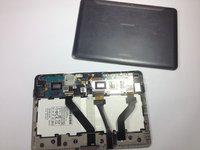
  3. Samsung Galaxy Tab 10.1 Battery Replacement: passo 3, immagine 1 di 3 Samsung Galaxy Tab 10.1 Battery Replacement: passo 3, immagine 2 di 3 Samsung Galaxy Tab 10.1 Battery Replacement: passo 3, immagine 3 di 3
    • Using the plastic opening tools, continue to carefully run along the right and bottom edge, and then lift the screen from the back panel.

    Chiedi a FixBot

    Aggiungi Commento

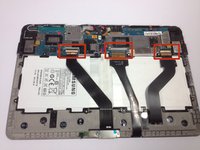
  4. Samsung Galaxy Tab 10.1 Battery Replacement, Battery: passo 4, immagine 1 di 3 Samsung Galaxy Tab 10.1 Battery Replacement, Battery: passo 4, immagine 2 di 3 Samsung Galaxy Tab 10.1 Battery Replacement, Battery: passo 4, immagine 3 di 3
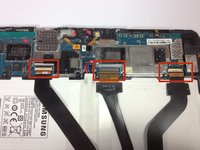
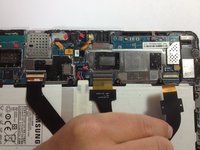
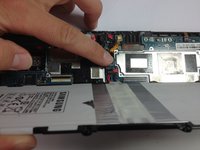
    • Flip up the retaining flaps on the ZIF connectors that secure the three large ribbon cables.

    • Carefully pull the three ribbon cables from their sockets on the motherboard.

    Chiedi a FixBot

    Aggiungi Commento

  5. Samsung Galaxy Tab 10.1 Battery Replacement: passo 5, immagine 1 di 2 Samsung Galaxy Tab 10.1 Battery Replacement: passo 5, immagine 2 di 2
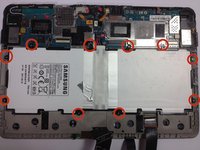
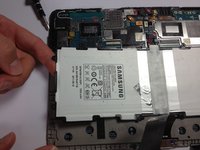
    • Remove the ten 3 mm Phillips #00 screws surrounding the battery.

    Chiedi a FixBot

    Aggiungi Commento

  6. Samsung Galaxy Tab 10.1 Battery Replacement: passo 6, immagine 1 di 3 Samsung Galaxy Tab 10.1 Battery Replacement: passo 6, immagine 2 di 3 Samsung Galaxy Tab 10.1 Battery Replacement: passo 6, immagine 3 di 3
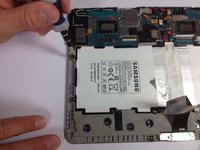
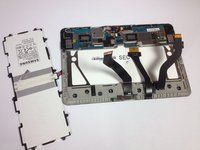
    • Lift the edge of the battery up with your finger or a spudger.

    • Detach the battery by holding the motherboard down while gently lifting the battery up.

    Chiedi a FixBot

    Aggiungi Commento

Conclusione

To reassemble your device, follow these instructions in reverse order.

Annulla: non ho completato questa guida.

Altre 61 persone hanno completato questa guida.

Team

Cal Poly, Team 13-5, Forte Fall 2013 Membro di Cal Poly, Team 13-5, Forte Fall 2013

CPSU-FORTE-F13S13G5

5 Membri

17 guide realizzate

20Commenti sulla guida

Those 3 plastic bands with connectors at the end are a really poor design and a drag to put back on correctly : there's a little white line drawn on each one that needs to be aligned with a line drawn on the socket itself. This means you really have to push them back in (with a little platic tool for example). If not you can have a non functioning screen or no touch detection.

zen - Rispondi Condividi

What if your stupid aunt is trying to open it and you can open it but she said that you broke it? What can I do about it. Ppl. HM

Isabella - Rispondi Condividi

What would be the correct battery that is suitable for the Tab proT520? I can't find any reference to this particular models battery..

Tomjonkins - Rispondi Condividi

good jobs man

corentin bouyssou - Rispondi Condividi

Nice tutorials, thank you! I want to ask you about exactly battery. Where is it better to order it/ I mean, if i order it online? I live in Europe and know some stores of hardware, such as hardware.nu and so on but also i know such stores as Amazon and eBay also Aliexpress..Tell me where is quaity is the best?

Scott Waschlerner - Rispondi Condividi

Aggiungi Commento

Visualizza statistiche:

Ultime 24 ore: 1

Ultimi 7 giorni: 29

Ultimi 30 giorni: 101

Tutti i Tempi: 363,426