Salta al contenuto principale
Unisciti alla Community delle riparazioni - Crea un account

Samsung Galaxy J1 Glass Screen Replacement

Cosa ti serve

  1. Samsung Galaxy J1 Glass Screen Replacement, Midframe: passo 1, immagine 1 di 1
    • Insert a finger nail or plastic opening tool between the back cover and the device.

    • Gently pry the rear cover off of the back of the phone.

    Chiedi a FixBot

    Aggiungi Commento

  2. Samsung Galaxy J1 Glass Screen Replacement: passo 2, immagine 1 di 2 Samsung Galaxy J1 Glass Screen Replacement: passo 2, immagine 2 di 2
    • Using a finger, pull the SIM card down out of its slot.

    • Remove the SIM card.

    • The pictured device is missing the SIM card and battery.

    Chiedi a FixBot

    Aggiungi Commento

  3. Samsung Galaxy J1 Glass Screen Replacement: passo 3, immagine 1 di 1
    • Using a Phillips #00 screwdriver remove the eleven 3 mm screws.

    Chiedi a FixBot

    Aggiungi Commento

  4. Samsung Galaxy J1 Glass Screen Replacement: passo 4, immagine 1 di 3 Samsung Galaxy J1 Glass Screen Replacement: passo 4, immagine 2 di 3 Samsung Galaxy J1 Glass Screen Replacement: passo 4, immagine 3 di 3
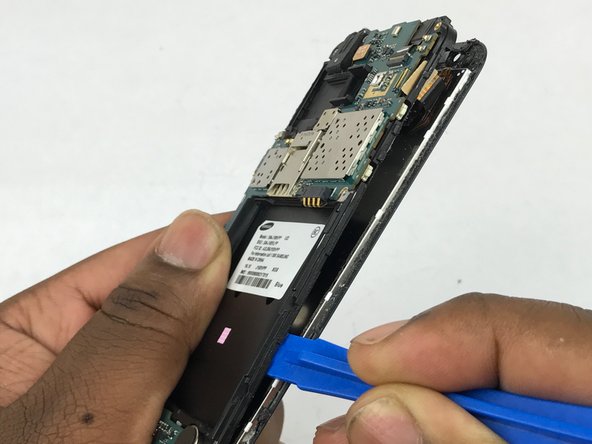
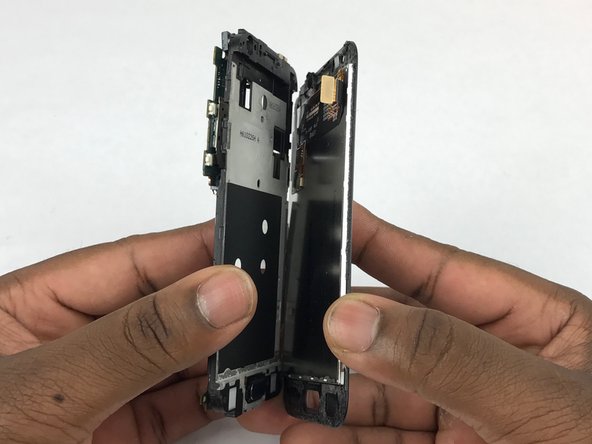
    • Insert a plastic opening tool between the screen and the back of the device.

    • Starting at the bottom of the device, gently slide the tool along the edges of the screen.

    • Gently pry the main assembly from the midframe of the device.

    • When removing the main assembly, pry gently so as to not crack the glass screen or break any clips within the device.

    Chiedi a FixBot

    Aggiungi Commento

  5. Samsung Galaxy J1 Glass Screen Replacement, Glass Screen: passo 5, immagine 1 di 2 Samsung Galaxy J1 Glass Screen Replacement, Glass Screen: passo 5, immagine 2 di 2
    • Using the flat end of a spudger, disconnect the digitizer cable connector.

    Chiedi a FixBot

    Aggiungi Commento

  6. Samsung Galaxy J1 Glass Screen Replacement: passo 6, immagine 1 di 2 Samsung Galaxy J1 Glass Screen Replacement: passo 6, immagine 2 di 2
    • Using a plastic opening tool pry between silver digitizer and black back piece.

    • Slowly slide plastic opening tool around the screen to loosen the adhesive.

    • Be careful not to tear the digitizer cable when threading it through the plastic housing.

    Chiedi a FixBot

    Aggiungi Commento

  7. Samsung Galaxy J1 Glass Screen Replacement: passo 7, immagine 1 di 1
    • Carefully separate display assembly from the plastic housing.

    Chiedi a FixBot

    Aggiungi Commento

Conclusione

To reassemble your device, follow these instructions in reverse order.

Annulla: non ho completato questa guida.

Altre 25 persone hanno completato questa guida.

Sean Kramer

Membro da: 02/14/18

1.632 Reputazione

6 guide realizzate

Team

USF Tampa, Team S5-G4, Eyestone Spring 2018 Membro di USF Tampa, Team S5-G4, Eyestone Spring 2018

USFT-EYESTONE-S18S5G4

3 Membri

8 guide realizzate

2Commenti sulla guida

In my Samsung J110h, Some of the right side keys in keyboard not working. They are P, Zero, In message screen, the sending button etc..

I am in desperate need for advice to rectify.

Will somebody help me.

My mail Id”: karupusolai@gmail.com

Solaimalai - Rispondi Condividi

I was having the display issue. So I bought Samsung Galaxy J1 Screen replacement. And, I replaced it by myself using the information in this.

harshithaemazel - Rispondi Condividi

Aggiungi Commento

Visualizza statistiche:

Ultime 24 ore: 1

Ultimi 7 giorni: 18

Ultimi 30 giorni: 75

Tutti i Tempi: 6,005