Salta al contenuto principale
Unisciti alla Community delle riparazioni - Crea un account

Samsung DV180F Repair Back control buttons Replacement

Visualizzazioni: 993

Visualizza statistiche:

Ultime 24 ore:
2
Ultimi 7 giorni:
21
Ultimi 30 giorni:
107
Tutti i Tempi:
993
Commenti: 0

Nessuno ha lasciato commenti su questa guida. Sarai il primo?

Vai ai commenti della guida
Completato: 0

Nessuno ha contrassegnato questa guida "completata". Sarai il primo?

Preferiti: 0

Nessuno ha preferito (e si è iscritto) questa guida. Sarai il primo?

Tempo necessario: 20 minuti
Difficoltà: Moderato
Samsung DV180F Repair Back control buttons Replacement

Introduzione

Vai al passo 1 ↓

This guide shows how to replace the back buttons panel of a Samsung DV180F when damaged. This procedure is very simple since the device is not entirely disassembled. It only involes loosening a few screws and unpluging the connecting ribbons.

Cosa ti serve

Strumenti

    1. Samsung DV180F Repair Back control buttons Replacement, Back Buttons Panel: passo 1, immagine 1 di 2 Samsung DV180F Repair Back control buttons Replacement, Back Buttons Panel: passo 1, immagine 2 di 2
      • Ensure the camera is turned off and battery is taken out before you begin.

      • Remove the two external screws from the camera using a Phillips 000 screwdriver.

      Chiedi a FixBot

      Aggiungi Commento

    2. Samsung DV180F Repair Back control buttons Replacement: passo 2, immagine 1 di 1
      • Insert a plastic opening tool in the gap between the camera body and back panel.

      • Pry along the right side of the camera to separate the back panel.

      Chiedi a FixBot

      Aggiungi Commento

    3. Samsung DV180F Repair Back control buttons Replacement: passo 3, immagine 1 di 1
      • Once the camera is open, remove the two internal screws using a Phillips 000 screwdriver.

      Chiedi a FixBot

      Aggiungi Commento

    4. Samsung DV180F Repair Back control buttons Replacement: passo 4, immagine 1 di 2 Samsung DV180F Repair Back control buttons Replacement: passo 4, immagine 2 di 2
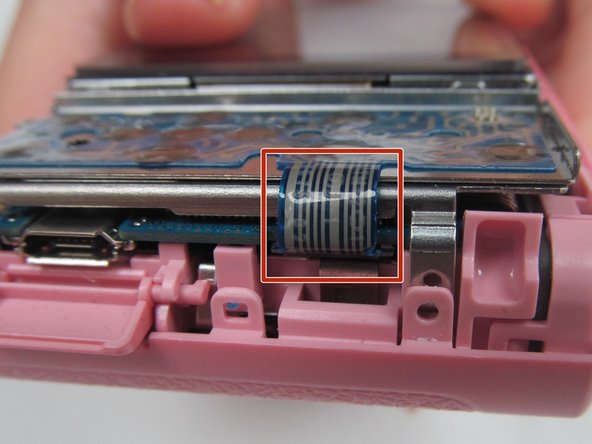
      • Use a plastic opening tool to release the lock securing the ribbon receptor to the right side of the motherboard.

      • Ribbons have to be unlocked before removal to prevent damage.

      Chiedi a FixBot

      Aggiungi Commento

    5. Samsung DV180F Repair Back control buttons Replacement: passo 5, immagine 1 di 1
      • Gently lift the circuit board from the camera.

      • Remove the display ribbon receptor lock to remove back panel from the motherboard.

      Chiedi a FixBot

      Aggiungi Commento

    6. Samsung DV180F Repair Back control buttons Replacement: passo 6, immagine 1 di 2 Samsung DV180F Repair Back control buttons Replacement: passo 6, immagine 2 di 2
      • Remove back display.

      • Replace the back button panel.

      Chiedi a FixBot

      Aggiungi Commento

Conclusione

To reassemble your device, follow these instructions in reverse order.

Annulla: non ho completato questa guida.

maria

Membro da: 09/26/16

256 Reputazione

2 guide realizzate

Team

USF Tampa, Team 14-4, Eyestone Fall 2016 Membro di USF Tampa, Team 14-4, Eyestone Fall 2016

USFT-EYESTONE-F16S14G4

4 Membri

48 guide realizzate

0Commenti sulla guida

Aggiungi Commento

Visualizza statistiche:

Ultime 24 ore: 2

Ultimi 7 giorni: 21

Ultimi 30 giorni: 107

Tutti i Tempi: 993