Salta al contenuto principale
Unisciti alla Community delle riparazioni - Crea un account

Samsung Ace Back Speakers Replacement

Visualizzazioni: 1381

Visualizza statistiche:

Ultime 24 ore:
3
Ultimi 7 giorni:
13
Ultimi 30 giorni:
84
Tutti i Tempi:
1.381
Commenti: 0

Nessuno ha lasciato commenti su questa guida. Sarai il primo?

Vai ai commenti della guida
Completato: 0

Nessuno ha contrassegnato questa guida "completata". Sarai il primo?

Preferiti: 4

4 persone hanno aggiunto ai preferiti (e si sono iscritte a) questa guida. Sarai il prossimo?

Tempo necessario: 10 - 15 minuti
Difficoltà: Moderato
Samsung Ace Back Speakers Replacement

Introduzione

Vai al passo 1 ↓

The back speaker emits noise for your phone's ringtones, music, sound effects, and speakerphone conversations. Installing a new back speaker may alleviate distorted or missing noise.

Cosa ti serve

Strumenti

    1. Samsung Ace Back Speakers Replacement, Battery: passo 1, immagine 1 di 3 Samsung Ace Back Speakers Replacement, Battery: passo 1, immagine 2 di 3 Samsung Ace Back Speakers Replacement, Battery: passo 1, immagine 3 di 3
      • To remove the back casing, firmly press down and push towards the bottom of the phone.

      Chiedi a FixBot

      Aggiungi Commento

    2. Samsung Ace Back Speakers Replacement: passo 2, immagine 1 di 1
      • With the casing removed, lift the battery from the indicated indentation.

      Chiedi a FixBot

      Aggiungi Commento

    3. Samsung Ace Back Speakers Replacement: passo 3, immagine 1 di 1
      • From here, you can now access the SIM card and model/serial numbers.

      Chiedi a FixBot

      Aggiungi Commento

    1. Samsung Ace Back Speakers Replacement, Casing: passo 4, immagine 1 di 1
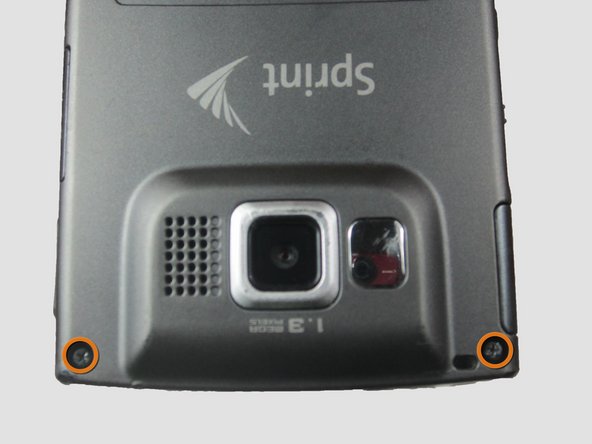
      • Using the Phillips #00 screwdriver, remove the four indicated screws (4.5 mm).

      Chiedi a FixBot

      Aggiungi Commento

    2. Samsung Ace Back Speakers Replacement: passo 5, immagine 1 di 2 Samsung Ace Back Speakers Replacement: passo 5, immagine 2 di 2
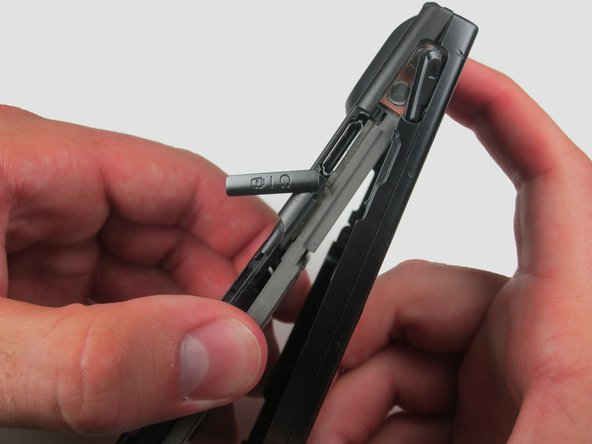
      • Press the pointed edge of the spudger into the side of the two rubber plugs in order to lift and remove them from the top of the phone.

      • Then, using the Phillips #00 screwdriver, remove the two indicated Phillip screws (6.5 mm).

      Chiedi a FixBot

      Aggiungi Commento

    3. Samsung Ace Back Speakers Replacement: passo 6, immagine 1 di 1
      • To remove the SIM card, start by pressing the top of the card and push down and away towards the bottom of the phone. Then, as indicated, pull the SIM card out.

      Chiedi a FixBot

      Aggiungi Commento

    4. Samsung Ace Back Speakers Replacement: passo 7, immagine 1 di 2 Samsung Ace Back Speakers Replacement: passo 7, immagine 2 di 2
      • Begin to slowly lift the back casing of the phone. You should hear a snap when the casing is released.

      • The power, volume, and camera buttons may fall out when separating the front and back casing.

      Chiedi a FixBot

      Aggiungi Commento

    5. Samsung Ace Back Speakers Replacement: passo 8, immagine 1 di 1
      • Your casing should be separated and the three loose buttons put to the side.

      • Be aware of the wiring on the top of the phone. Make sure not to pull it apart when separating the case.

      Chiedi a FixBot

      Aggiungi Commento

    6. Samsung Ace Back Speakers Replacement: passo 9, immagine 1 di 2 Samsung Ace Back Speakers Replacement: passo 9, immagine 2 di 2
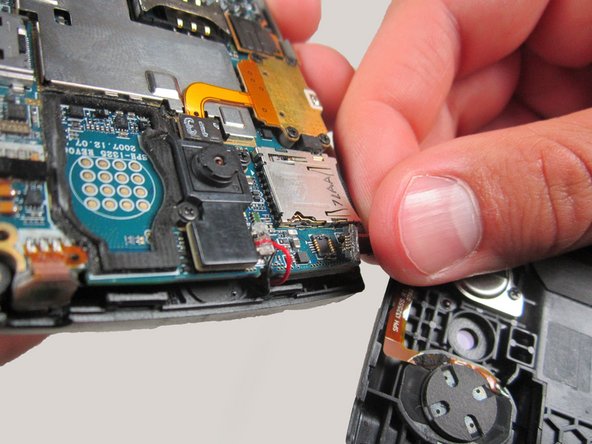
      • Slowly remove the back casing by gently pulling the ribbon connection.

      Chiedi a FixBot

      Aggiungi Commento

    7. Samsung Ace Back Speakers Replacement: passo 10, immagine 1 di 2 Samsung Ace Back Speakers Replacement: passo 10, immagine 2 di 2
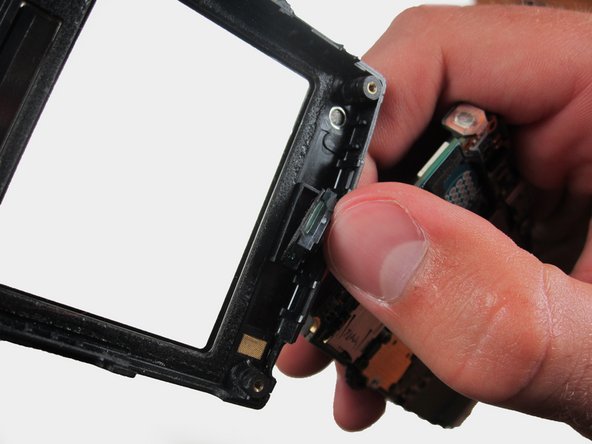
      • Gently pull on the wires to remove the front casing.

      Chiedi a FixBot

      Aggiungi Commento

    8. Samsung Ace Back Speakers Replacement: passo 11, immagine 1 di 1
      • Your front casing and front speaker are now released.

      Chiedi a FixBot

      Aggiungi Commento

    1. Samsung Ace Back Speakers Replacement, Back Speakers: passo 12, immagine 1 di 1
      • Locate the back speaker.

      Chiedi a FixBot

      Aggiungi Commento

    2. Samsung Ace Back Speakers Replacement: passo 13, immagine 1 di 1
      • Use the flat edge of the spudger to gently pry and remove the speaker.

      Chiedi a FixBot

      Aggiungi Commento

Conclusione

To reassemble your device, follow these instructions in reverse order.

Annulla: non ho completato questa guida.

Breanne

Membro da: 04/12/12

187 Reputazione

5 guide realizzate

Team

Cal Poly, Team 6-24, Amido Spring 2012 Membro di Cal Poly, Team 6-24, Amido Spring 2012

CPSU-AMIDO-S12S6G24

3 Membri

84 guide realizzate

0Commenti sulla guida

Aggiungi Commento

Visualizza statistiche:

Ultime 24 ore: 3

Ultimi 7 giorni: 13

Ultimi 30 giorni: 84

Tutti i Tempi: 1,381