Salta al contenuto principale
Unisciti alla Community delle riparazioni - Crea un account

Pioneer Elite PRO-RO6U Motherboard Replacement

Cosa ti serve

  1. Pioneer Elite PRO-RO6U Motherboard Replacement, Power Supply Cooling Fan: passo 1, immagine 1 di 1
    • Remove the two 6.4 mm Phillips screws on each side of the device's casing.

    Chiedi a FixBot

    Aggiungi Commento

  2. Pioneer Elite PRO-RO6U Motherboard Replacement: passo 2, immagine 1 di 1
    • Remove the two 6.5 mm Phillips screws on the back of the device casing.

    Chiedi a FixBot

    Aggiungi Commento

  3. Pioneer Elite PRO-RO6U Motherboard Replacement: passo 3, immagine 1 di 1
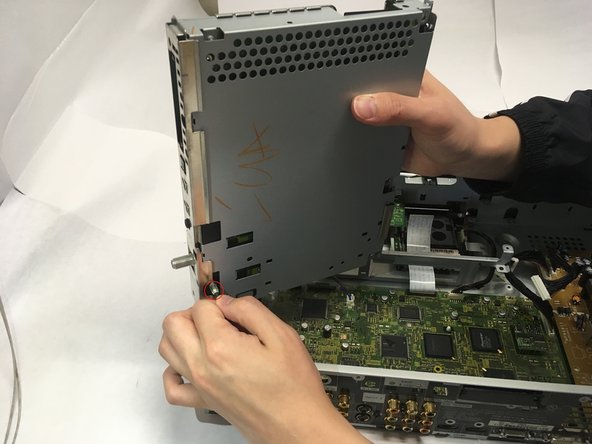
    • Grip the front panel in one hand and the back of the casing in the other. Pull the casing back, and slide it up and away from the inner box.

    Chiedi a FixBot

    Aggiungi Commento

  4. Pioneer Elite PRO-RO6U Motherboard Replacement: passo 4, immagine 1 di 1
    • To replace the back cooling fan, grip the ribbon connector at slot M10 and remove by gently pulling upward.

    Chiedi a FixBot

    Aggiungi Commento

  5. Pioneer Elite PRO-RO6U Motherboard Replacement: passo 5, immagine 1 di 1
    • Remove the two 6.5 mm Phillips mounting screws at the back of the device.

    Chiedi a FixBot

    Aggiungi Commento

  6. Pioneer Elite PRO-RO6U Motherboard Replacement: passo 6, immagine 1 di 1
    • Grip the frame of the cooling fan and slide away from the back wall until the tabs are no longer in the holes of the casing.

    • Lift the cooling fan out of the device.

    Chiedi a FixBot

    Aggiungi Commento

  7. Pioneer Elite PRO-RO6U Motherboard Replacement, Motherboard: passo 7, immagine 1 di 1
    • To remove the optical drive cooling fan, grip the ribbon connector at M11 and gently remove by pulling away for the slot.

    Chiedi a FixBot

    Aggiungi Commento

  8. Pioneer Elite PRO-RO6U Motherboard Replacement: passo 8, immagine 1 di 1
    • Flip the latch on the ribbon connector upward to allow for cable removal.

    • Grip the ribbon cable and remove by gently pulling away from the unlatched connector.

    Chiedi a FixBot

    Aggiungi Commento

  9. Pioneer Elite PRO-RO6U Motherboard Replacement: passo 9, immagine 1 di 1
    • Remove the two 6.4 mm Phillips mounting screws on the optical drive cooling fan.

    Chiedi a FixBot

    Aggiungi Commento

  10. Pioneer Elite PRO-RO6U Motherboard Replacement: passo 10, immagine 1 di 1
    • Grip the frame of the cooling fan and slide it toward the front panel, then lift out of the device.

    Chiedi a FixBot

    Aggiungi Commento

  11. Pioneer Elite PRO-RO6U Motherboard Replacement: passo 11, immagine 1 di 1
    • Unplug ribbon cables D4 and D5. To unplug D4, flip the gate up and pull the ribbon away.

    Chiedi a FixBot

    Aggiungi Commento

  12. Pioneer Elite PRO-RO6U Motherboard Replacement: passo 12, immagine 1 di 1
    • Remove four 1/4th inch Phillips screws on the back of the casing.

    • Unscrew and remove the nut from the threaded connector.

    Chiedi a FixBot

    Aggiungi Commento

  13. Pioneer Elite PRO-RO6U Motherboard Replacement: passo 13, immagine 1 di 2 Pioneer Elite PRO-RO6U Motherboard Replacement: passo 13, immagine 2 di 2
    • The optical drive is still connected by a cable on its bottom side, lift the drive upwards only slightly when first removing from the casing.

    • Pull the optical drive toward the interior of the device and then lift upwards, then pull to remove the cord on the bottom left corner before removing the drive completely.

    Chiedi a FixBot

    Aggiungi Commento

  14. Pioneer Elite PRO-RO6U Motherboard Replacement: passo 14, immagine 1 di 2 Pioneer Elite PRO-RO6U Motherboard Replacement: passo 14, immagine 2 di 2
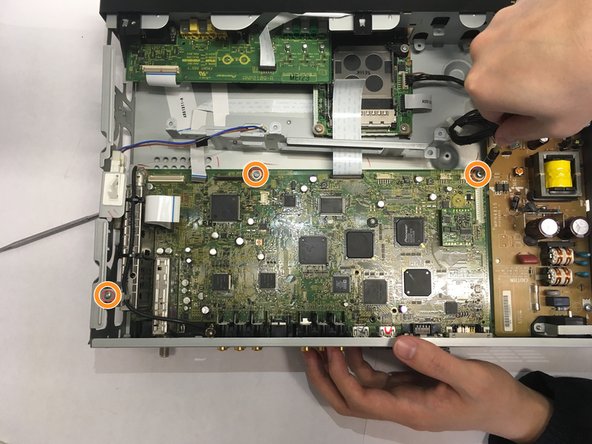
    • Unplug connectors at M1, M4, M7, M8, M9 by gently pulling upward.

    • Remove all 3/8 inch Phillips screws connecting motherboard to casing.

    Chiedi a FixBot

    Aggiungi Commento

  15. Pioneer Elite PRO-RO6U Motherboard Replacement: passo 15, immagine 1 di 1
    • Remove the five 1/4 inch Phillips screws and two 1/8 inch Phillips screws on the back of the casing.

    • Unscrew and remove nut from threaded connector.

    Chiedi a FixBot

    Aggiungi Commento

  16. Pioneer Elite PRO-RO6U Motherboard Replacement: passo 16, immagine 1 di 1
    • Remove four 1/2 inch screws using a nutdriver.

    Chiedi a FixBot

    Aggiungi Commento

  17. Pioneer Elite PRO-RO6U Motherboard Replacement: passo 17, immagine 1 di 1
    • Pinch the securing tabs and lift the motherboard toward the interior of the device to remove it.

    Chiedi a FixBot

    Aggiungi Commento

  18. Pioneer Elite PRO-RO6U Motherboard Replacement: passo 18, immagine 1 di 1
    • Pull it toward the interior of the device and lift it away.

    Chiedi a FixBot

    Aggiungi Commento

Conclusione

To reassemble your device, follow these instructions in reverse order.

Annulla: non ho completato questa guida.

Cody Carter

Membro da: 01/30/18

1.049 Reputazione

6 guide realizzate

Team

Baylor, Team S1-G5, Johnson Spring 2018 Membro di Baylor, Team S1-G5, Johnson Spring 2018

BU-JOHNSON-S18S1G5

3 Membri

6 guide realizzate

0Commenti sulla guida

Aggiungi Commento

Visualizza statistiche:

Ultime 24 ore: 1

Ultimi 7 giorni: 6

Ultimi 30 giorni: 35

Tutti i Tempi: 1,155