Salta al contenuto principale

One Education Infinity Upper Case Replacement

Cosa ti serve

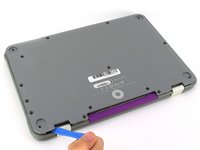
  1. One Education Infinity Upper Case Replacement, Back Case: passo 1, immagine 1 di 3 One Education Infinity Upper Case Replacement, Back Case: passo 1, immagine 2 di 3 One Education Infinity Upper Case Replacement, Back Case: passo 1, immagine 3 di 3
    • Always power off your device before beginning disassembly.

    • Remove the screw covers and rubber feet from the bottom of the laptop with a metal spudger.

  2. One Education Infinity Upper Case Replacement: passo 2, immagine 1 di 2 One Education Infinity Upper Case Replacement: passo 2, immagine 2 di 2
    • Using a Phillips #00 screwdriver, remove the sixteen 5.0 mm black screws from the back panel.

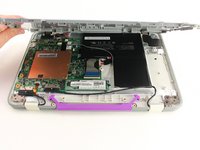
  3. One Education Infinity Upper Case Replacement: passo 3, immagine 1 di 3 One Education Infinity Upper Case Replacement: passo 3, immagine 2 di 3 One Education Infinity Upper Case Replacement: passo 3, immagine 3 di 3
    • Using the iFixit plastic opening tool or spudger, start near the white hinge of the device and lift along the outer edges of the device until all clips are released.

    • Lift the back case off of the device.

    • Removing the back may create a loud snapping noise.

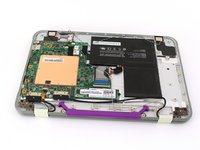
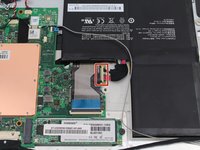
  4. One Education Infinity Upper Case Replacement, Battery: passo 4, immagine 1 di 3 One Education Infinity Upper Case Replacement, Battery: passo 4, immagine 2 di 3 One Education Infinity Upper Case Replacement, Battery: passo 4, immagine 3 di 3
    • There may be black tape inside your device covering components or holding down wires. This tape is unimportant for the function of the device, and can be removed.

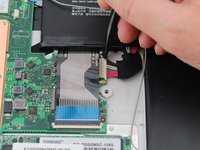
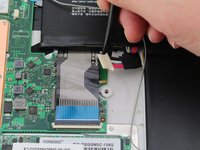
    • Carefully wiggle the battery cable to the right and out of the port with a plastic spudger.

  5. One Education Infinity Upper Case Replacement: passo 5, immagine 1 di 3 One Education Infinity Upper Case Replacement: passo 5, immagine 2 di 3 One Education Infinity Upper Case Replacement: passo 5, immagine 3 di 3
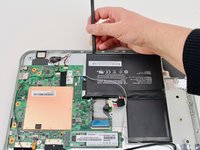
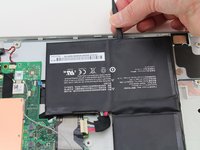
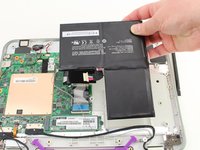
    • Wedge a plastic spudger underneath the battery from the upper edge and slide it carefully along the length of the battery to separate it from the case.

    • There is a mild adhesive holding down the battery. Take care not to puncture or excessively bend the battery while freeing it from the adhesive.

    • Lift the battery out from the internal case.

  6. One Education Infinity Upper Case Replacement, Upper Case: passo 6, immagine 1 di 3 One Education Infinity Upper Case Replacement, Upper Case: passo 6, immagine 2 di 3 One Education Infinity Upper Case Replacement, Upper Case: passo 6, immagine 3 di 3
    • Flip open the laptop so that the screen is exposed.

    • We found it convenient to flip the laptop into tablet mode for added support.

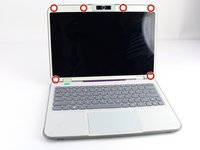
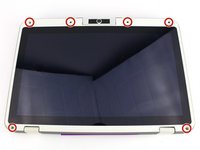
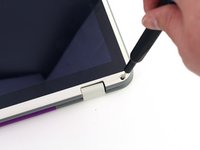
    • Using a spudger, remove the six screw covers along the bezel of the screen.

  7. One Education Infinity Upper Case Replacement: passo 7, immagine 1 di 2 One Education Infinity Upper Case Replacement: passo 7, immagine 2 di 2
    • Remove the six 2.8 mm Phillips #00 screws along the bezel.

  8. One Education Infinity Upper Case Replacement: passo 8, immagine 1 di 3 One Education Infinity Upper Case Replacement: passo 8, immagine 2 di 3 One Education Infinity Upper Case Replacement: passo 8, immagine 3 di 3
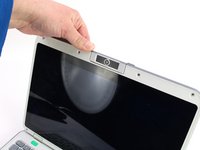
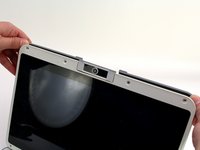
    • Use the two tabs on the top edge of the screen to pry the case apart.

    • Once the two top clips have been disengaged, start to work your way around the rest of the screen.

  9. One Education Infinity Upper Case Replacement: passo 9, immagine 1 di 1
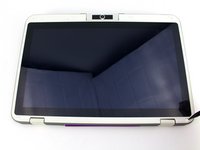
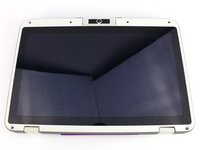
    • Once all the clips have been popped off, remove the upper case from the back of the display assembly.

    • You may want to close the laptop while disconnecting the hinge-side edge, as it will give you extra clearance for the upper case.

Conclusione

To reassemble your device, follow these instructions in reverse order.

Austin Blakely

Membro da: 03/11/19

22.242 Reputazione

53 Guide realizzate

Team

iFixit Membro di iFixit

Staff

123 Membri

23.726 Guide realizzate

0Commenti sulla guida

Aggiungi Commento

Visualizza Statistiche:

Ultime 24 Ore: 0

Ultimi 7 Giorni: 2

Ultimi 30 Giorni: 13

Tutti i Tempi: 159