Salta al contenuto principale

Nook Color Front Cover Replacement

Solo Prerequisita
Questa è una guida che contiene solo i prerequisiti! Questa guida fa parte di un'altra procedura e non è destinata ad essere utilizzata da sola.

Cosa ti serve

  1. Nook Color Front Cover Replacement, Back Cover: passo 1, immagine 1 di 2 Nook Color Front Cover Replacement, Back Cover: passo 1, immagine 2 di 2
    • Remove the two 3.8 mm screws located in the back right corner of the device using the T5 Torx screwdriver.

  2. Nook Color Front Cover Replacement: passo 2, immagine 1 di 2 Nook Color Front Cover Replacement: passo 2, immagine 2 di 2
    • Pry off the back cover with the plastic opening tool. Go around the device with the tool to ensure complete detachment.

  3. Nook Color Front Cover Replacement, Front Cover: passo 3, immagine 1 di 1
    • Remove the ten 4.0 mm screws from the device's perimeter using the T5 Torx screwdriver.

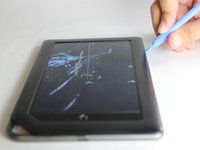
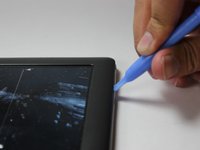
  4. Nook Color Front Cover Replacement: passo 4, immagine 1 di 2 Nook Color Front Cover Replacement: passo 4, immagine 2 di 2
    • Pry off the front panel using the plastic opening tool.

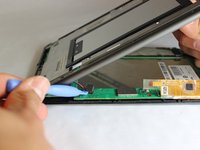
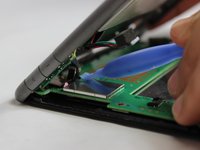
  5. Nook Color Front Cover Replacement: passo 5, immagine 1 di 2 Nook Color Front Cover Replacement: passo 5, immagine 2 di 2
    • Lift up on the connectors to disconnect them using the plastic opening tool.

Conclusione

To reassemble your device, follow these instructions in reverse order.

Team

USF Tampa, Team 11-5, Blackwell Winter 2015 Membro di USF Tampa, Team 11-5, Blackwell Winter 2015

USFT-BLACKWELL-W15S11G5

3 Membri

14 Guide realizzate

0Commenti sulla guida

Aggiungi Commento

Visualizza Statistiche:

Ultime 24 Ore: 0

Ultimi 7 Giorni: 0

Ultimi 30 Giorni: 4

Tutti i Tempi: 72