Salta al contenuto principale

Nokia Classic 2600c-2b Battery Replacement

Cosa ti serve

  1. Nokia Classic 2600c-2b Battery Replacement, Battery: passo 1, immagine 1 di 2 Nokia Classic 2600c-2b Battery Replacement, Battery: passo 1, immagine 2 di 2
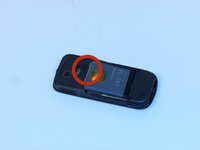
    • Press down on the button located at the bottom of the phone, using the center ridge as a guide.

    • Pull the phone apart from the bottom, keeping the button pressed down.

    • CAUTION! The plastic opening tool may be used to gain leverage. Some force is required to open.

  2. Nokia Classic 2600c-2b Battery Replacement: passo 2, immagine 1 di 1
    • Remove the back cover to expose the battery.

  3. Nokia Classic 2600c-2b Battery Replacement: passo 3, immagine 1 di 2 Nokia Classic 2600c-2b Battery Replacement: passo 3, immagine 2 di 2
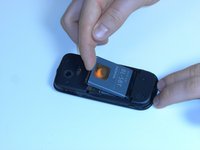
    • Place a finger or plastic opening tool in the gap between the battery and the phone.

    • Gently lift the battery out.

    • Follow the instructions in reverse order to reassemble the phone.

Conclusione

To reassemble your device, follow these instructions in reverse order.

Altre 2 persone hanno completato questa guida.

Ian VanZandt

Membro da: 02/14/12

699 Reputazione

5 Guide realizzate

Team

0Commenti sulla guida

Aggiungi Commento

Visualizza Statistiche:

Ultime 24 Ore: 0

Ultimi 7 Giorni: 0

Ultimi 30 Giorni: 4

Tutti i Tempi: 908