Salta al contenuto principale

Motorola Droid Pro Screen Replacement

Cosa ti serve

  1. Motorola Droid Pro Screen Replacement, SD Card/SIM Card PCB Board: passo 1, immagine 1 di 2 Motorola Droid Pro Screen Replacement, SD Card/SIM Card PCB Board: passo 1, immagine 2 di 2
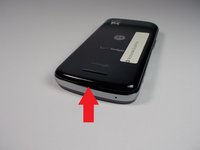
    • Remove the back cover and battery by using the thumb tabs.

  2. Motorola Droid Pro Screen Replacement: passo 2, immagine 1 di 1
    • Unscrew the 8 back panel screws using the T4 Torx screwdriver.

  3. Motorola Droid Pro Screen Replacement: passo 3, immagine 1 di 1
    • Use a spudger to open the phone along the sides between the back panel and the chrome trim.

    • It is held together by small clips that lock in. You may have to use a little force to unlock them.

    • Go around on all sides then pull the back panel off.

  4. Motorola Droid Pro Screen Replacement: passo 4, immagine 1 di 2 Motorola Droid Pro Screen Replacement: passo 4, immagine 2 di 2
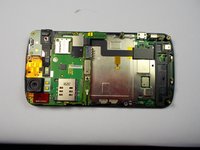
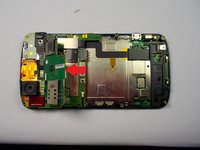
    • Gently lift the SD & SIM card board (PCB) as shown in the following pictures.

    • This will expose the ribbon cable attached to the board and another ribbon cable for the mother board. Remove them both using the spudger.

    • Once the small one is removed the small board can be pulled off.

  5. Motorola Droid Pro Screen Replacement, Screen: passo 5, immagine 1 di 1
    • Unscrew the 6 screws using the T5 Torx screwdriver.

  6. Motorola Droid Pro Screen Replacement: passo 6, immagine 1 di 1
    • Unlock the ribbon cable and then you can pull the screen out.

    • When replacing screen make sure you lock the ribbon cable back in place.

Conclusione

To reassemble your device, follow these instructions in reverse order.

Team

0Commenti sulla guida

Aggiungi Commento

Visualizza Statistiche:

Ultime 24 Ore: 0

Ultimi 7 Giorni: 1

Ultimi 30 Giorni: 8

Tutti i Tempi: 358